
Incoming Access Webhook
Courses and ContentThe incoming access webhook gives a person access when they paid somewhere else. You sell on Make, Zapier, Gumroad, a CRM or your own checkout, and that system POSTs one signed request to Learnomy.
Learnomy records the access only. The money, the receipt and any refund stay on the platform that took the payment, so no sale, commission or payment event is written here, and an automation that listens to Learnomy's payment events cannot loop back into a second sale.
What you can do#
- Give a course, a membership plan, and with Learnomy Pro a learning path, a seat in an existing Space or a cohort place, as soon as someone pays elsewhere.
- Create the person's account if they do not have one yet.
- Take that order's access back when it is refunded or cancelled (
op: revoke). Access the person has from anywhere else stays. - See and fix every grant in Learnomy Settings > Access Log.
- See every call, accepted or refused, in Payment Log, filter Incoming webhook.
- Send a signed test grant from the admin screen.
How to use it#
Step 1 -- open the Webhooks screen#
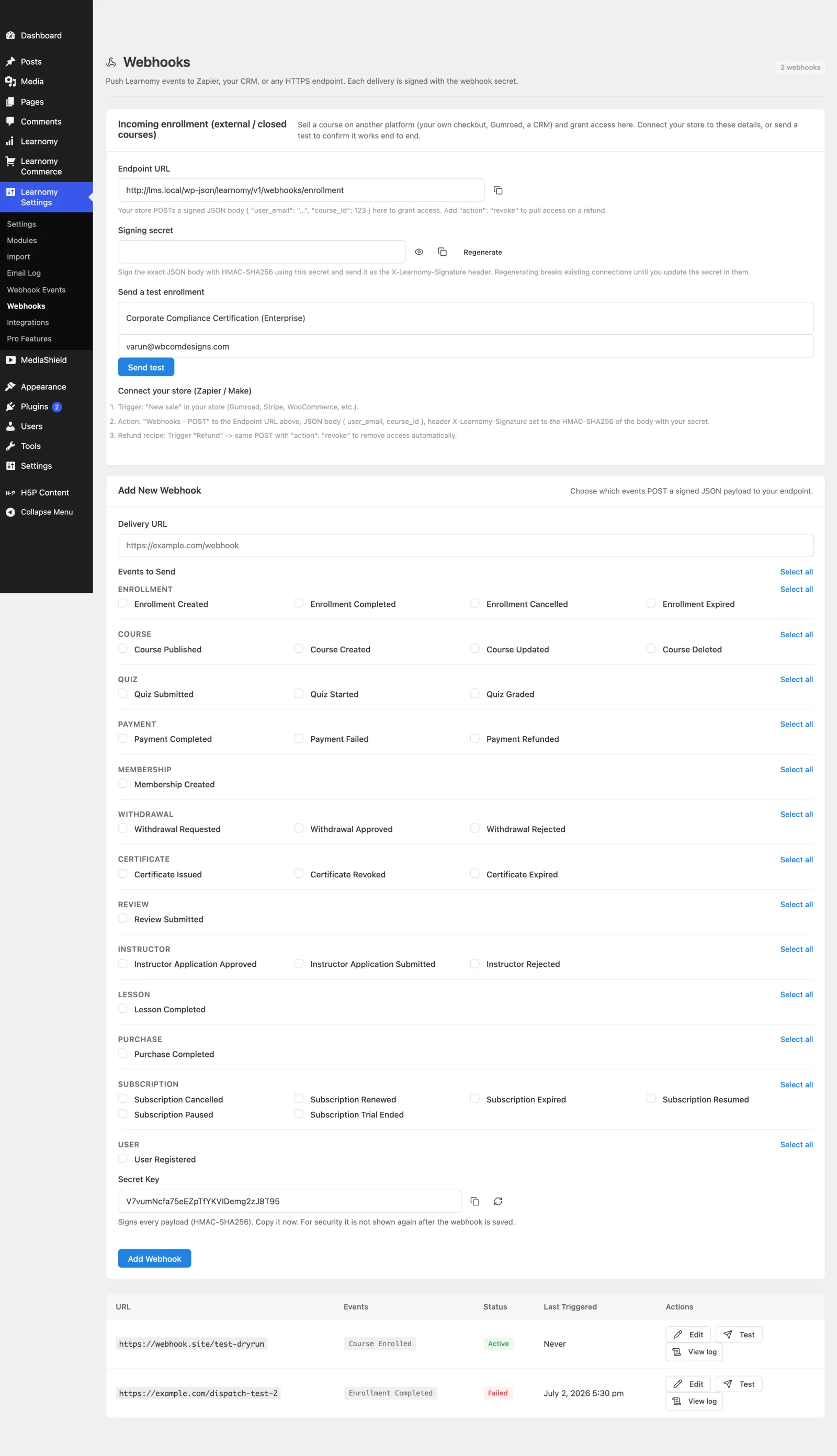
Go to Learnomy Settings -> Webhooks (?page=learnomy-webhooks). The Incoming access panel is at the top. Under the heading it shows when the last call arrived, how many arrived in the last 24 hours, and a link to the log.
Step 2 -- copy the endpoint URL#
POST /wp-json/learnomy/v1/webhooks/enrollment
Step 3 -- create and copy the signing secret#
Every request must be signed. With no secret set, every request is refused.
- Click Regenerate to create a secret.
- Use the show and copy buttons to copy it into your tool.
When you regenerate later, the old secret keeps working for 24 hours, so you can update each connected tool without losing a grant. If you regenerated because the secret leaked, click Stop accepting it now under the secret and the old one is refused at once.
Step 4 -- sign each request#
- Send the current unix time (seconds) in the
X-Learnomy-Timestampheader. - Compute the HMAC-SHA256 of
{timestamp}.{body}(the time, a dot, then the exact request body you send), keyed with your secret, as hex. - Send it in the
X-Learnomy-Signatureheader. Asha256=prefix is accepted and optional. - A request more than five minutes old is refused, so a captured request cannot be replayed later.
JSON and form-encoded bodies are both accepted.
Step 5 -- send a test grant#
Pick a course and an email under Send a test grant and click Send test. Learnomy signs the request the same way your tool must and sends it through the live endpoint, so the whole grant runs. It then takes the access back again, removes the test's Access Log row, and the account if the test created one. Nobody is notified and no outgoing webhook fires. The call stays in Payment Log > Incoming webhook.
Step 6 -- connect your tool#
Make
- Trigger: the "new order" (or "order paid") module of your store.
- Create JSON module with the fields below (
op=grant). - HTTP > Make a request: method POST, URL = the endpoint, body type Raw, content type JSON, request content = the JSON from step 2.
- Header
X-Learnomy-Timestamp=formatDate(now; "X"). - Header
X-Learnomy-Signature=sha256(<the timestamp> + "." + <the JSON>; "hex"; <your secret>). Make'ssha256function computes an HMAC when you give it a key.
Zapier
Trigger: "New order" in your store.
Code by Zapier (JavaScript): build the body string, take the time and compute the HMAC:
const crypto = require('crypto');
const body = JSON.stringify({
  op: 'grant',
  user_email: inputData.email,
  item_id: Number(inputData.course_id),
  purchase_type: 'course',
  external_ref: inputData.order_id,
});
const timestamp = String(Math.floor(Date.now() / 1000));
const signature = crypto.createHmac('sha256', inputData.secret).update(timestamp + '.' + body).digest('hex');
return { body, timestamp, signature };
Webhooks by Zapier > Custom Request: method POST, URL = the endpoint, Data =
bodyfrom step 2, headersContent-Type: application/json,X-Learnomy-Timestamp=timestampandX-Learnomy-Signature=signaturefrom step 2.
Always send external_ref, your order or membership id. Make and Zapier retry on timeouts, and with external_ref a retry grants once. When the order is refunded or cancelled, send the same external_ref with op: revoke.
Granting access (op grant / op revoke)#
op: grantwithuser_email,item_id,external_ref(the order or membership id) andpurchase_type:course,membership_plan(alsomembershiporplan), and with Learnomy Prolearning_path,space(a seat in an existing Space) orcohort. The Webhooks screen lists the values your site accepts. A Space Plan is sold through Learnomy's own checkout, not granted. A membership plan granted this way is billed by your store: Learnomy never renews, reminds or cancels it.op: revokewith the sameexternal_reftakes that order's access back (a refund or cancellation at your store). Access the person has from anywhere else stays. A revoke whose email matches no account answersnot_activeand changes nothing.- Both must be signed with
X-Learnomy-Timestamp(sign{timestamp}.{body}); a request without it is refused with 403. - Sending the same grant again answers
alreadyand changes nothing. If you remove a grant in Learnomy, the same order is not granted again; a new order is.
Recording a sale (deprecated)#
op: purchase (the default when op is missing) and op: refund still work in this release and stop in the next one. They record the outside sale in Transactions with commission and payment events, as if it had been paid on your own checkout, and answer with a deprecated note. While a tool still sends them, your commerce screens show a notice naming the last call. Change the step to op: grant / op: revoke.
The email the person gets#
One email per grant, Your access is ready, listing what they got and the store's name. When the grant created their account, it carries their Set your password button. It replaces, for that person and that grant, the welcome per course, the membership email and WordPress's separate set-password email, so a store order is one email, not three.
Turn it off under Learnomy Settings > Emails > Access Ready (from a store), for
example when your store already sends its own; the usual emails then send as
before, so a new account still gets its way in. Developers can switch it per
store with the learnomy_access_granted_email filter.
See and fix what was granted: the Access Log#
Learnomy Settings > Access Log lists every grant a store, a membership plugin or a recipe sent, newest first: the person, what they got, the store and its order number, and the status. Filter by status, store or kind of access, or search by the buyer's email or the order number.
- Active - the person has the access. Remove takes it back now; a replay of the same order does not give it back, a new order does. The store keeps any money; refund the order there if needed.
- Refused - Learnomy could not give it, and the row says why (for example Complete these Courses first, or a full cohort). Try again asks once more after you fix the cause. Grant anyway gives it regardless, for that person only, where the rule allows it (course prerequisites, cohort size). The sender also got a 422 for it.
- Ended at the source - the store, membership plugin, recipe or WP Fusion tag that gave it took it back (refund, cancellation, tag removed).
- Removed by you - you took it back, here or with Remove access on the Student screen (or
wp learnomy unenroll). A replay of the same order does not give it back; a new order does.
The request body#
| Field | Required | Notes |
|---|---|---|
user_email |
Yes | The buyer. Matched case-insensitively; a new account is created if none exists. |
item_id |
Yes | What to give, by id. course_id is accepted as an alias. Numbers sent as text are fine. |
external_ref |
Yes (except revoke of a deprecated sale) |
Your order or membership id, at most 191 characters. One order can cover several items: send one request per item with the same external_ref. |
op |
No | grant or revoke (access only, see above); purchase (default) and refund are deprecated. The older action: enroll / action: revoke still works. |
amount |
No | Deprecated purchase / refund only. Gross amount including tax, 0 or more. Defaults to 0. For refund, the amount to refund; 0 or missing refunds what is left. |
tax |
No | Deprecated purchase only. Tax inside amount. It is kept out of the commission base. |
currency |
No | Deprecated purchase only. Must be the site's currency. Missing means the site's currency. A different currency is refused, so a EUR sale is never shown under another currency's symbol. |
access_days |
No | Deprecated purchase only. Fixed-term access in days. 0 uses the course's own setting. |
coupon |
No | Deprecated purchase only. Code of a Learnomy coupon the sale used, so earnings split on the paid amount and the coupon's usage count moves. |
full_name |
No | Used when a new account is created. |
provider |
No | Label for where the call came from, for example make or gumroad, shown in the Access Log. |
refund_ref |
No | For refund: your refund id, to tell two partial refunds of the same amount apart. |
purchase_type |
No | For op: grant: course (default), membership_plan, and with Pro learning_path, space, cohort. For the deprecated op: purchase: course only. |
Responses#
| Status | When |
|---|---|
| 200 | Done. result is granted, already or removed_by_admin for a grant; revoked or not_active for a grant's revoke; enrolled, already_recorded (a retry; access is re-checked and restored if missing), refunded, already_refunded, revoked or no_access for the deprecated ops. |
| 400 | The body is malformed: bad email, missing external_ref, negative amount, unknown op, and so on. Nothing was written. |
| 401 / 403 | No secret configured, missing signature, wrong signature, a stale timestamp, or a grant or revoke without X-Learnomy-Timestamp. Nothing was written. |
| 404 | The course, or for a refund the sale, was not found. |
| 409 | The external_ref belongs to a different buyer, the order was already refunded (send a new external_ref), or the sale was recorded but enrollment was refused. Fix the cause and send the same request again; it will enroll. |
| 422 | A currency other than the site's, an unknown coupon, a refund larger than what is left, or an unsupported purchase_type. Nothing was written. |
Every call, whatever its status, is logged in Payment Log, filter Incoming webhook. The log keeps the status, error code, external_ref, course and a masked email; it never stores the full body. Rows follow the Data retention setting.
For developers#
REST routes (namespace learnomy/v1):
POST /webhooks/enrollment-- the public endpoint. The permission callback is__return_truebecause the signature is verified inside the handler, over the raw body.POST /admin/webhooks/incoming/regenerate-secret-- rotates the secret (admin only). The previous secret is accepted for 24 hours.POST /admin/webhooks/incoming/revoke-previous-secret-- stops accepting the previous secret now (admin only).POST /admin/webhooks/incoming/test-- sends a signed test grant (op: grant) for acourse_idanduser_email, then takes it back again; the response carriescleaned_up(admin only).
Adding a source with its own wire format (Gumroad, Teachable, a webhook that signs differently): implement Learnomy\Adapters\Inbound_Purchase_Source (get_id, matches, verify, normalise) and register it:
add_filter( 'learnomy_incoming_purchase_sources', function ( array $sources ) {
	$sources['gumroad'] = new My_Gumroad_Source();
	return $sources;
} );
Sources are asked in order; the first whose matches() returns true handles the request, and the built-in generic source is asked last. A source only verifies and reads the request. Fulfilment always goes through Incoming_Purchase_Service: op: grant / op: revoke call Access_Grant_Service; the deprecated sale calls Purchase_Provisioner::provision() and Refund_Service::apply().
Hooks:
learnomy_incoming_purchase_sources(filter) -- the inbound sources,id => Inbound_Purchase_Source.learnomy_incoming_webhook_payload(filter) -- the normalised operation (op,user_email,item_id,external_ref,amount,tax,currency,access_days,coupon,refund_ref,provider) before it is carried out, plus theWP_REST_Request.learnomy_external_enrollment_requested(action) -- after a buyer has access, with$user_id,$course_idand theWP_REST_Request.- A grant fires
learnomy_access_grant_createdand, when the person gains a course,learnomy_access_granted. Only the deprecated sale fireslearnomy_purchase_completedandlearnomy_payment_completed.
Ledger identity (deprecated sale only): a sale is stored with provider_transaction_id = external_ref. When the same external_ref already pays for another course, the next course's line is stored as {external_ref}:course:{course_id}.
Options: learnomy_incoming_webhook_secret (current secret) and learnomy_incoming_webhook_secret_previous (the replaced secret and when it stops working). Neither autoloads.