
Quiz Modes
Quizzes and GradingEvery quiz runs in one of three modes -- Graded, Practice, or Survey. The mode decides whether the quiz is scored, whether it counts toward course completion, and whether it collects answers at all. You set it once on the quiz editor.
What you can do#
- Run a Graded quiz that is scored, passes or fails against a passing percentage, and gates course completion when the course requires a quiz.
- Run a Practice quiz that is still auto-scored so students see how they did, but never blocks course completion -- a low-stakes self-check.
- Run a Survey that collects student answers without grading them, with no score and no pass/fail.
- Switch a quiz between modes at any time from the quiz editor.
- Use any mode with any quiz layout and any question types.
How to use it#
Step 1 -- open the quiz editor#
Go to Learnomy > Quizzes and edit a quiz (or add a new one).
Step 2 -- pick the mode#
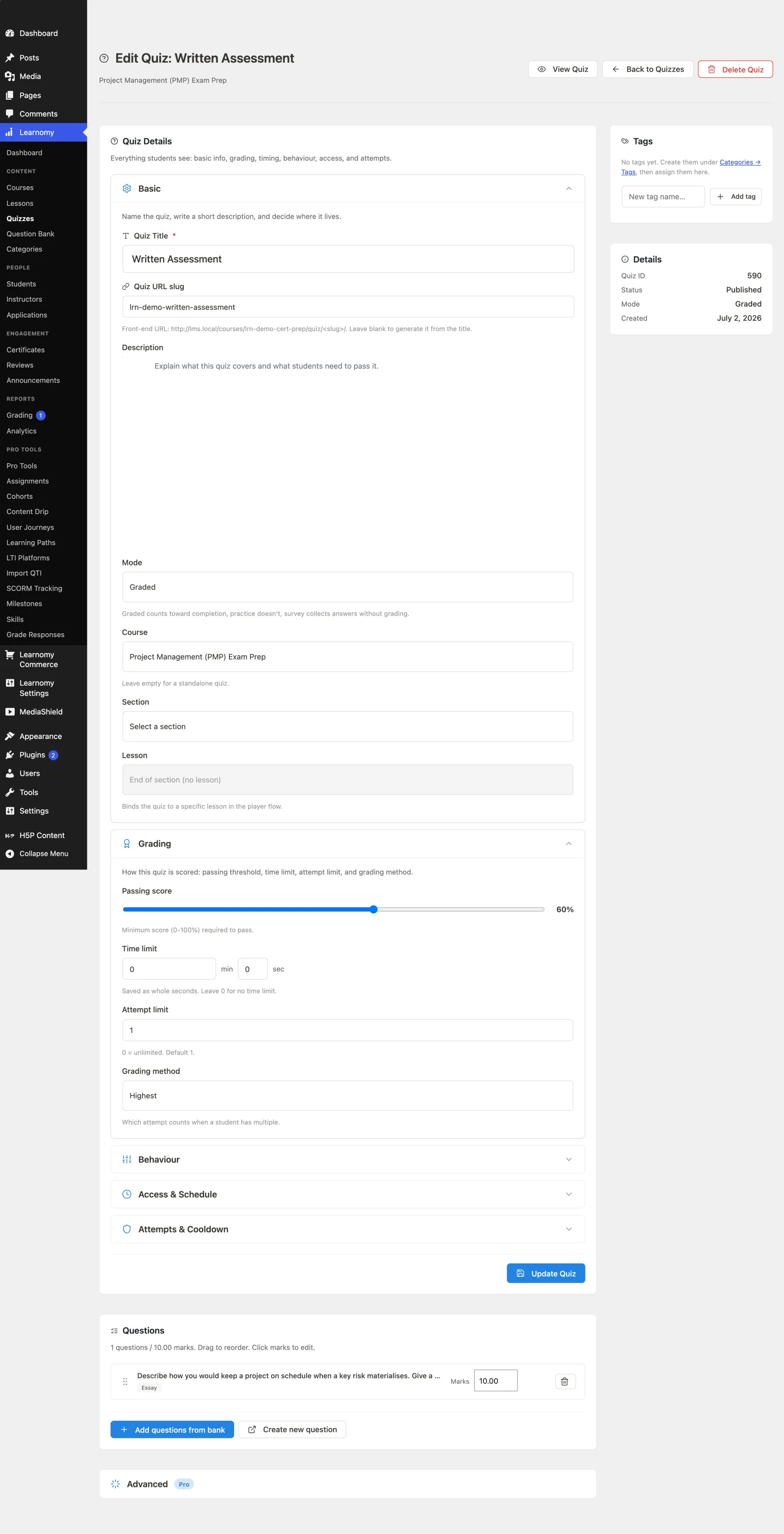
Find the Mode dropdown in the quiz settings and choose one of:
- Graded -- the default. The quiz is scored on submit and produces a pass/fail result.
- Practice -- scored on submit so the student sees their result, but the result never holds up course completion.
- Survey -- answers are collected on submit with no grading, no score, and no pass/fail.
The help text under the field states the rule directly: "Graded counts toward completion, practice doesn't, survey collects answers without grading."
Step 3 -- set the passing score (Graded only)#
For a Graded quiz, set the Passing score percentage. Practice and Survey quizzes ignore the passing score, because Practice always counts as passed and Survey has no score.
Step 4 -- save#
Save the quiz. The mode takes effect on the next attempt.
Settings and options#
The Mode is stored on the quiz and drives what happens when a student submits:
| Mode | Value | Scored? | Pass/fail? | Counts toward completion? |
|---|---|---|---|---|
| Graded | graded |
Yes, auto-graded on submit | Yes, against the passing score | Yes -- for a course that requires a quiz, the student must pass |
| Practice | practice |
Yes, auto-graded so the student sees a result | No gate -- always treated as passed | No -- never blocks completion |
| Survey | survey |
No -- responses are stored, not graded | No | No -- a survey is always satisfied once submitted |
Notes:
- A Graded quiz with essay or manual-grade questions holds at "submitted" until an instructor grades the open responses, then finalises to "graded". See Grading Submissions.
- A Survey never fires the pass/fail outcome, so integrations that react to a pass or fail are skipped for surveys.
- The passing-score rule is the same across every layout; the mode, not the layout, decides whether it applies.
For developers#
- Storage:
lrn_quizzes.mode-- one ofgraded(default),practice,survey. - REST: the quiz create and update endpoints (
learnomy/v1/quizzes) acceptmode(enumgraded|practice|survey) and return it on the quiz resource. - Grading path:
Learnomy\Services\Quiz_Serviceauto-grades on submit for graded/practice and stores responses without grading for survey;Progress_Servicetreats practice and survey quizzes as always-passed so they never gate course completion. - Hooks:
learnomy_quiz_submittedfires for every submitted attempt;learnomy_quiz_passed/learnomy_quiz_failed/learnomy_quiz_gradedfire only for graded (and practice) attempts -- surveys are skipped because they have no pass/fail.