
Instructor Students Roster
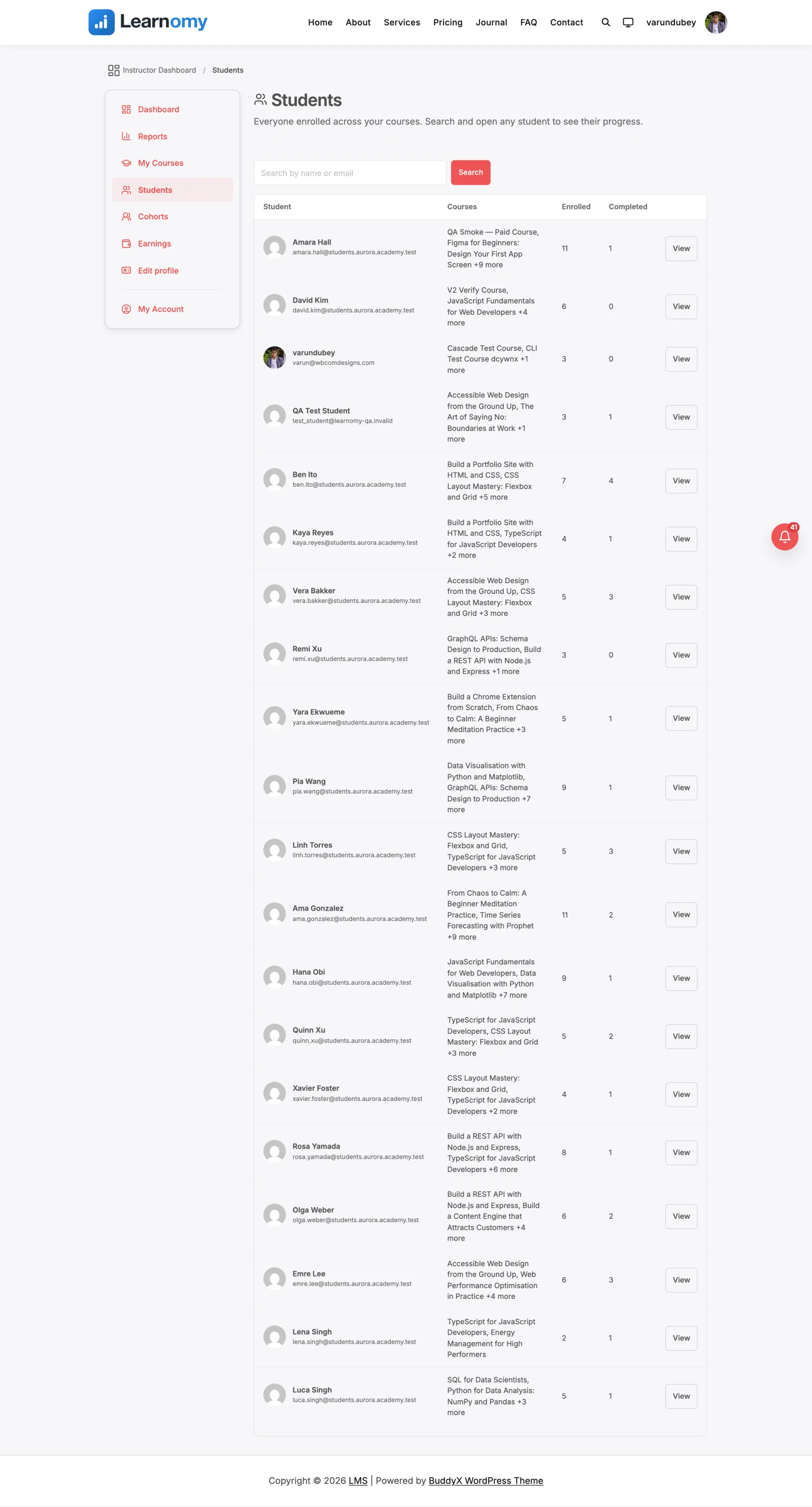
Instructors and EarningsThe Students roster is an instructor's list of everyone enrolled across the courses they teach. It lives on the instructor dashboard at /instructor/students/ and lets an instructor search the roster and open any student to see how that learner is progressing in their courses.
What you can do#
- See a single list of every distinct student across all the courses you author or co-teach, even when the same student is in more than one of your courses.
- Search the roster by name or email to find one learner quickly.
- Read per-student aggregates at a glance: how many of your courses they are enrolled in and how many they have completed.
- Open any student to a detail view that shows each of your courses they are in, their progress percentage, whether they have completed it, and when they enrolled.
- Stay scoped to your own students only. You never see a learner unless they are enrolled in one of your courses, and you cannot open another instructor's student by guessing a URL.
- Work at scale. The list is paginated in the database (20 per page), so a large roster loads a page at a time instead of everything at once.
How to use it#
Step 1 - open the roster#
From the instructor dashboard, click Students in the instructor navigation. This opens the roster at /instructor/students/. Only users with the instructor role (or an admin) can reach it.
Step 2 - find a student#
Use the Search by name or email box at the top and press Search. The roster filters to matching students. Clear the box and search again to return to the full list.
Step 3 - read the roster columns#
The roster is a scanning tool: it answers who and how many, and the student page answers which. Each row shows:
- Student - avatar, display name, and email.
- Enrolled - how many of your courses the student is enrolled in.
- Completed - how many of those they have completed.
Step 4 - page through a large roster#
When there are more students than fit on one page, a pagination control appears under the table. The list shows 20 students per page. Your search term is carried across pages.
Step 5 - open a student#
Click the student's name or the View button. The detail view shows a header with their name, email, and an "enrolled / completed" summary, followed by an Enrolled in your courses table. Each row is one of your courses with the student's Progress percentage, a Completed or In progress status badge, and the Enrolled date. The course title links to the course page.
Only your own courses appear in the detail view. If the student is not in any of your courses, you see a "Student not found" message instead - this is the ownership guard, not an error.
Settings & options#
This is a built-in part of the instructor dashboard. There is no separate setting to enable it, and it does not use a learnomy_settings[...] key. Access is governed by roles and course ownership:
- The viewer must have the
lrn_instructorrole or themanage_optionscapability (admin). - Instructors are scoped to courses where they are the author or a co-instructor. Admins see every student across the site (no course filter).
- Completion counts and course names in both the list and the detail view are scoped to the viewer's own courses, so a count reflects enrollments in your courses, not the student's platform-wide history.
- The list shows 20 students per page (
PER_PAGEin the view-data resolver).
For developers#
View-data resolver: Learnomy\Services\View_Data\Instructor_Students_View_Data::resolve() backs the instructor-students route and the templates/instructor-students.php template. It runs in three modes: list, detail (via ?student=N), and denied. Query args read from the request are s (search), paged (1-based page), and student (detail student id).
Route and navigation:
- Route name
instructor-students, path{instructor_slug}/students, registered inincludes/class-routes.php. Resolve its URL withLearnomy\route_url( 'instructor-students' ).
Model methods used (no per-row queries):
Learnomy\Models\Enrollment::get_distinct_user_ids_paginated( $course_id, $per_page, $offset, $search, $scope_course_ids )- the DB-paged roster.Learnomy\Models\Enrollment::counts_for_users( $user_ids, $scope_course_ids )- per-student enrolled/completed aggregates.Learnomy\Models\Enrollment::get_distinct_for_user( $student_id, $limit )- the detail view's enrollment rows.Learnomy\Models\Course::get_for_instructor( $user_id, $limit, $offset )- resolves the instructor's course scope (nullscope = admin).
Filters:
learnomy_instructor_students_list- filter the roster rows before render. Passed( $students, $scope_course_ids, $is_admin ). Use it to anonymise learner identity (name / email / avatar) while keeping the metrics;$is_adminis passed so consumers never mask data for admins.learnomy_instructor_student_detail- companion filter for one student's detail record. Passed( $student, $is_admin ).
Ability / REST (read-only, admin or manage_own_courses):
learnomy/list-students- paginated student roster with enrollment and completion counts, scoped to the caller's courses, with optionalcourse_id,search,page, andper_pageinputs.