
LTI 1.3 Tool Provider
Integrations pro Pro featurePro feature. Available in Learnomy Pro.
Let another LMS (Canvas, Moodle, Blackboard, or any LTI 1.3 platform) launch a Learnomy course as an external tool. A learner clicks a link in their institution's LMS, lands directly in the mapped Learnomy course already logged in and enrolled, and when they complete a graded quiz the score is pushed back into the LMS gradebook.
What you can do#
- Register Learnomy as an LTI 1.3 tool in your institution's LMS and connect one or many platforms to it.
- Let students launch straight from the LMS: no separate Learnomy sign-up, no second password. The launch itself is the enrollment, so the platform's roster controls who gets in.
- Map each platform to a default Learnomy course, and optionally map individual LMS links (resource links) to different courses, so one platform can launch many courses from different modules.
- Auto-provision a Learnomy account on first launch, or link the launch to an existing Learnomy account that shares the same email.
- Push quiz grades back to the LMS gradebook automatically (LTI Advantage AGS), so instructors grade in one place.
- Bypass Learnomy's own payment gate for LTI learners: an LTI launch is the institution's entitlement decision, the same way an admin manual enrollment is.
How to use it#
LTI is an opt-in module. It ships in beta and is never on by default, so the first step is to enable it. Connecting a platform is a two-way exchange: you paste Learnomy's tool URLs into the LMS, then paste the LMS's values back into Learnomy.
- Go to Learnomy Settings > Modules and enable LTI 1.3 (listed under Integrations, with a Beta badge). It requires Learnomy Pro.
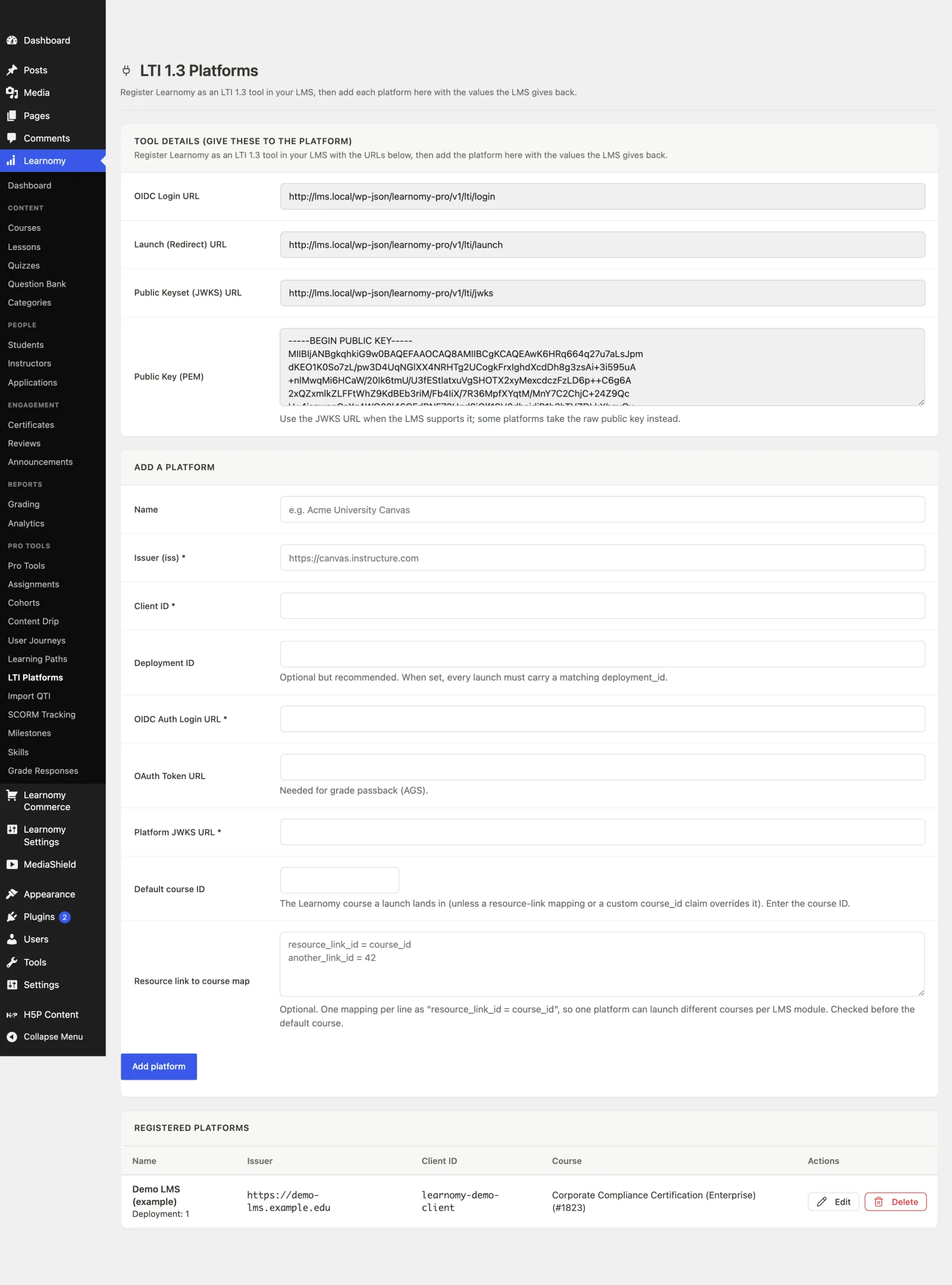
- Open Learnomy > Pro Tools > LTI Platforms. The top card, Tool details (give these to the platform), shows the four values your LMS needs: the OIDC Login URL, the Launch (Redirect) URL, the Public Keyset (JWKS) URL, and the raw Public Key (PEM). Each field is read-only and selects on focus so you can copy it cleanly.
- In your LMS, register a new LTI 1.3 developer key / external tool and paste those URLs in. Use the JWKS URL when the LMS supports it; some platforms take the raw public key instead.
- Your LMS now gives you its own values back: an Issuer (
iss), a Client ID, a Deployment ID, the platform's OIDC Auth Login URL, its OAuth Token URL, and its Platform JWKS URL. - Back on the LTI Platforms screen, fill in the Add a platform form with those values. Set the Default course ID to the Learnomy course this platform should launch into. Click Add platform.
- (Optional) Use Resource link to course map to launch different courses from different LMS links. Enter one mapping per line as
resource_link_id = course_id. A resource-link mapping is checked before the default course. - Add a link/assignment in your LMS that points at the tool, then launch it as a student. The learner is redirected through OIDC login, the signed launch is validated, and they land in the mapped Learnomy course, logged in and enrolled.
- (Optional) To turn on grade passback, make sure the platform's OAuth Token URL is filled in and the LMS link is configured to accept grades. When a learner completes a graded quiz in that course, Learnomy sends the score to the LMS gradebook automatically.
Settings and options#
- LTI 1.3 module (
Learnomy Settings > Modules) - the on/off switch for the whole feature. Category: Integrations. Status: Beta. Requires Learnomy Pro. - LTI Platforms screen (
Learnomy > Pro Tools > LTI Platforms) - register and manage platforms. Limited to users who canmanage_options(the site owner). - Tool details (read-only, per site) - OIDC Login URL, Launch (Redirect) URL, Public Keyset (JWKS) URL, and Public Key (PEM). The tool keypair is generated automatically when the module is activated, so these are ready immediately.
- If the Public Key (PEM) field shows an error instead of a key, your server could not create an RSA key, which almost always means PHP is missing the
opensslextension or your host has restricted it. Nothing else on this page will work until that is fixed: Learnomy cannot sign a launch without a key, so the JWKS URL serves an empty keyset and every launch from your LMS fails signature verification. Ask your host to enable the PHPopensslextension, then reload the page. The key is created automatically as soon as the server can make one, and no other setting needs changing. - Per-platform fields:
- Name - a label for your own reference (for example "Acme University Canvas").
- Issuer (iss) - the platform's issuer identifier. Required.
- Client ID - the client id the LMS assigned to Learnomy. Required.
- Deployment ID - optional but recommended. When set, every launch must carry a matching
deployment_idor it is rejected. - OIDC Auth Login URL - the platform's authorize endpoint. Required.
- OAuth Token URL - the platform's token endpoint. Needed only for grade passback (AGS).
- Platform JWKS URL - where Learnomy fetches the platform's public keys to verify each launch. Required.
- Default course ID - the Learnomy course a launch lands in, unless a resource-link mapping or a
course_idcustom claim overrides it. - Resource link to course map - optional. One mapping per line as
resource_link_id = course_id. Checked before the default course.
- Course resolution order - Learnomy picks the target course most-specific first: a per-resource-link mapping, then a
course_idcustom claim from the launch, then the platform default course. - User provisioning - a launch is identified by issuer plus subject and stored against a stable
learnomy_lti_uid. On first launch Learnomy creates an account; if the launch carries an email that matches an existing account, it links to that account instead. New users are created with thesubscriberrole by default. - Enrollment source - LTI launches enroll with the
ltisource, which bypasses the payment gate. Enrollment is idempotent, so re-launching never double-enrolls.
For developers#
The LTI module lives in Learnomy Pro at includes/extensions/lti/. RS256 and JWKS crypto are hand-rolled on OpenSSL (no bundled JWT dependency). The platform registry is one table, lrn_pro_lti_platforms, keyed unique on (issuer, client_id, deployment_id).
REST routes (namespace learnomy-pro/v1) - all three are public by the LTI spec (permission_callback is __return_true); security comes from the payload, exactly like a signed payment webhook:
| Method | Route | Purpose |
|---|---|---|
GET |
/lti/jwks |
Publish the tool's public JWK set so the platform can verify JWTs Learnomy signs (for example AGS client-assertions). |
GET or POST |
/lti/login |
OIDC third-party login initiation. Confirms the issuer is registered, mints a single-use state + nonce, and redirects to the platform's authorize endpoint. |
POST |
/lti/launch |
Validate the signed id_token, provision + enroll the learner, and 302 them into the mapped course. |
Launch validation gauntlet (class-launch.php) - before anything is created, the launch runs: single-use state consume (blocks replay), platform lookup from the trusted state, signature verification against the platform JWKS, then the claim checks - iss, aud = client_id, exp/iat (60s leeway), nonce matches the minted one, deployment_id, message_type = LtiResourceLinkRequest, and version = 1.3.0. Any failure returns a WP_Error and nothing is provisioned.
Grade passback (class-ags.php) - at launch the AGS lineitem endpoint is stashed per user + course. The learnomy_quiz_graded action triggers Ags::on_quiz_graded(), which mints a tool-signed JWT client-assertion, exchanges it for a client_credentials access token at the platform token endpoint, and POSTs the score to the lineitem's /scores endpoint. Passback is best-effort: failures are logged, never fatal to grading.
Actions and filters:
learnomy_user_provisioned- fires when a launch creates a new account, with( int $user_id, array $context )where$contextcarriessource(lti),issuer,platform_id, andclaims.learnomy_lti_link_by_email- filter (bool, defaulttrue) - whether a launch may link to an existing account by matching email.learnomy_lti_new_user_role- filter (defaultsubscriber) - the role for a newly provisioned LTI user.learnomy_validate_enrollment_source- the Free filter the module hooks to authorize theltienrollment source (bypassing the payment gate).
The delete action on the Platforms list routes through the shared admin row-action machinery (DELETE /learnomy-pro/v1/lti/platforms/{id}), so it uses the same confirm modal, toast, and in-place row removal as every other Learnomy admin list.