
QTI Assessment Import
Integrations pro Pro featurePro feature. Available in Learnomy Pro.
Import an IMS QTI 2.x or 3.0 assessment (a .zip content package or a single .xml item) and turn it into native Learnomy questions. Imported items become real question-bank rows, so they play in the normal quiz player, grade through the normal grader, and appear in the normal reports, exactly like a question you typed in by hand.
What you can do#
- Bring assessments authored in a QTI-compliant tool or exported from another platform straight into your Learnomy question bank, without re-typing them.
- Import a whole QTI content package (
.zip) at once, or a single item (.xml). - Map each QTI interaction to a native question type: single-answer and multiple-answer choice become multiple choice, text-entry becomes short answer, and extended-text becomes essay.
- Import match and order interactions as matching and ordering questions too, when the Advanced Quizzes module is enabled.
- Preview a package before you commit: see how many questions of each type will be created and which items will be skipped, without writing anything to the database.
- File the imported questions under a question category, and optionally create a graded quiz that groups them, in the same step.
- Import a large package safely: every item is independent, so a handful of unsupported or malformed items are skipped and listed while the rest still import.
How to use it#
QTI is an opt-in module. It ships as stable and is never on by default, so the first step is to enable it.
- Go to Learnomy Settings > Modules and enable QTI (listed under Integrations). Nothing QTI-related loads until this is on.
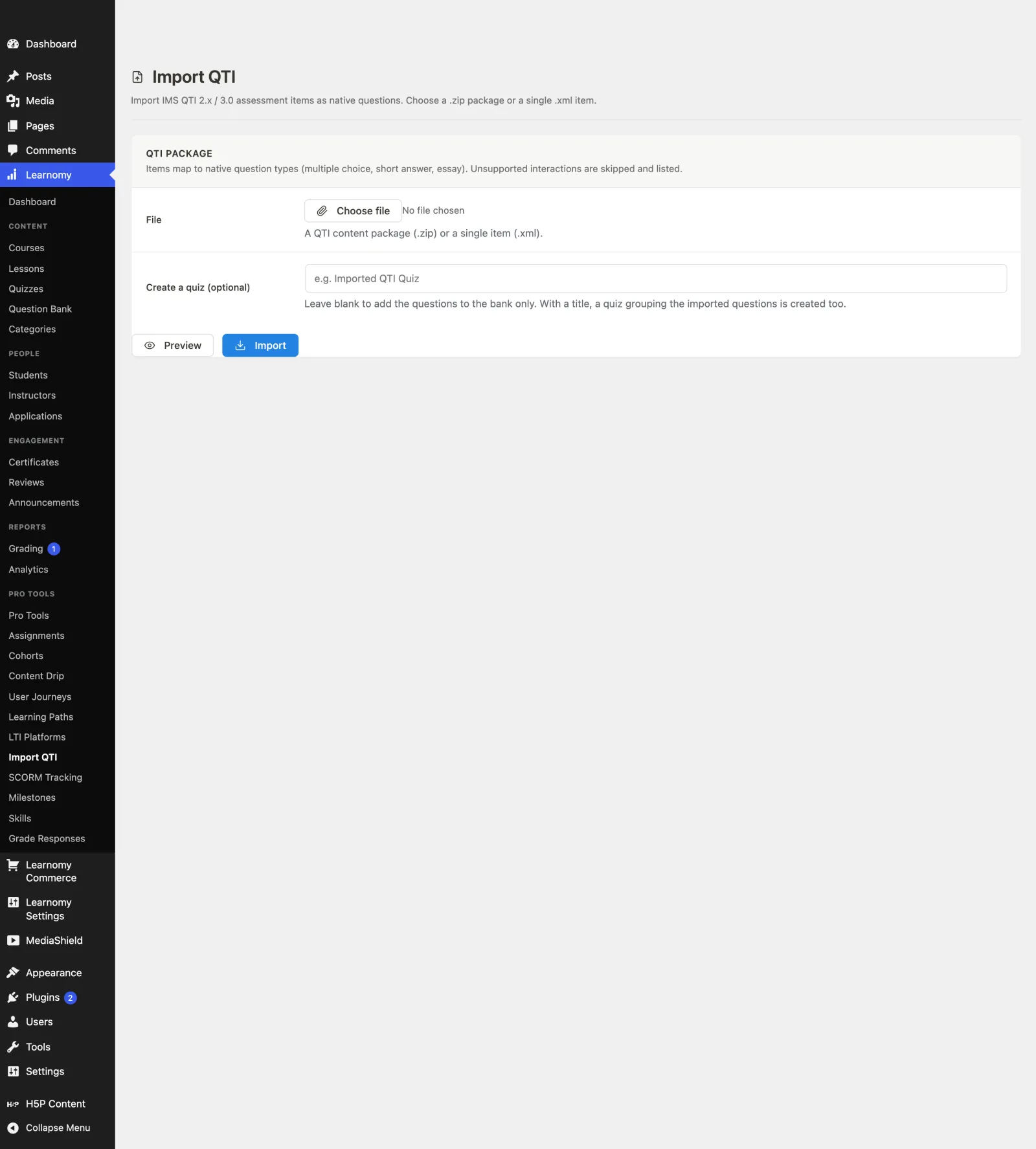
- Open Learnomy > Pro Tools > Import QTI (a submenu under the Learnomy menu). You need the capability to author questions to see this page.
- In the File field, click Choose file and pick a QTI content package (
.zip) or a single item (.xml). - Optionally, type a title in Create a quiz (optional). Leave it blank to add the questions to the bank only. With a title, a new graded, published quiz is created that groups the imported questions in order.
- Click Preview first. This runs a dry run: it parses the package and shows how many questions of each type would be created and which items would be skipped, without creating anything.
- When the preview looks right, click Import. The status line reports how many questions were created, and any skipped items are listed with the reason.
- The imported questions are now in your question bank (published). Add them to any quiz from the normal quiz editor, or, if you supplied a quiz title, open the new quiz and it is ready to play.
You can also import through the REST API (see For developers). Both surfaces run the same importer and create the same native questions.
Settings and options#
- QTI module (
Learnomy Settings > Modules) - the on/off switch for the whole feature. Category: Integrations. Status: Stable. It requires Learnomy Pro. - Supported formats - IMS QTI 2.x and 3.0. Upload a content package (
.zip) or a single item (.xml). The importer reads only the assessment item XML inside a package; the manifest and schema files are ignored. - Supported interactions -
choiceInteraction(single answer) becomes multiple choice (single),choiceInteraction(multiple answers) becomes multiple choice (multi),textEntryInteractionbecomes short answer, andextendedTextInteractionbecomes essay (manually graded, no accepted answer).matchInteractionbecomes matching andorderInteractionbecomes ordering, but only when the Advanced Quizzes module is active (those two question types are provided by Advanced Quizzes). Any interaction with no mapping is skipped and listed, never imported as something the player cannot render. - File field - accepts
.zipand.xml. A single.xmlis treated as one item. - Create a quiz (optional) - a text field. Blank imports to the question bank only. A title creates a graded, published quiz that holds the imported questions in import order.
- Category - imported questions can be filed under a question category so they are easy to find and reuse in the question editor.
- Maximum package size - defaults to 50 MB, applied to both the uploaded file and the total uncompressed size of a
.zip. Change it with thelearnomy_qti_max_package_mbfilter (return the limit in MB). - Import permission - the Import QTI page and the REST route are both gated by the same capability,
learnomy_manage_own_courses(the same bar as authoring a question). Change who can import with thelearnomy_qti_import_capfilter. - Preview (dry run) - the Preview button never writes to the database. It returns per-type counts and the skip list so you can check a package before importing.
Uploaded QTI XML is parsed in memory and turned into question rows; nothing from the package is written to disk or served publicly. The parser is XXE-safe, and a .zip is treated as hostile input: it is rejected if it exceeds the size limit, holds too many entries, expands past the size limit (a zip-bomb guard), or contains an unsafe file path.
For developers#
The QTI module lives in Learnomy Pro at includes/extensions/qti/. It creates native questions through the Free models (Question, Answer, Quiz, QuizSlot), so there is no QTI table and no separate runtime, player, or grader.
REST route (namespace learnomy-pro/v1):
| Method | Route | Purpose | Gate |
|---|---|---|---|
POST |
/qti/import |
Import an uploaded QTI package or item (multipart with a file field). Optional params: quiz_title, category_id, dry_run. |
Authenticated and can author questions (learnomy_qti_import_cap). |
With dry_run true the response contains counts, preview, and skipped and creates nothing. On a real import the response contains created_count, skipped, and quiz_id (the id of the created quiz, or null when no title was given).
Filters:
learnomy_qti_import_cap- capability required to import QTI, for the page and the REST route (defaultlearnomy_manage_own_courses).learnomy_qti_max_package_mb- maximum package size in MB, applied to the upload and the uncompressed total (default50).learnomy_qti_interaction_mappers- the interaction-to-builder map. Register a callable for a QTI interaction key (for examplematch,order, or a custom one) to import interactions the core does not map, without forking.
Imported questions are created as published with the current user as author, and are added to the given category when one is supplied. Because they are ordinary questions, they participate in the standard quiz, grading, and reporting pipelines with no QTI-specific code path.