
Rich Question Stems
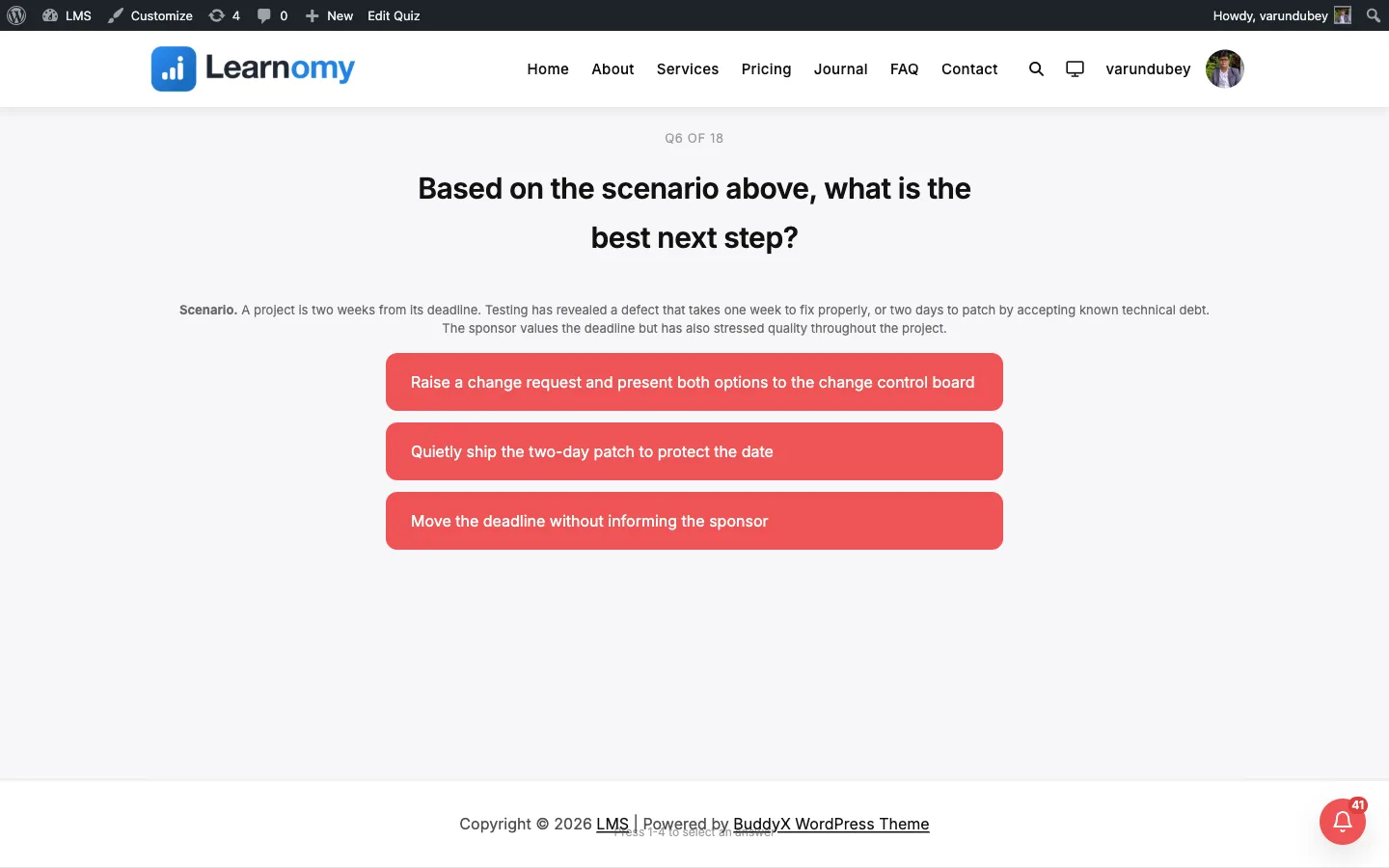
Quizzes and GradingA rich question stem is an optional formatted passage, code block, or image shown above the answer choices for any question type. It gives students the material they need to answer, without cluttering the plain question prompt.
What you can do#
- Add a formatted passage (headings, lists, bold, links) above the answers of any question.
- Paste a code block for programming or scripting questions.
- Insert an image, chart, or diagram that the question refers to.
- Use one stem across every question type: multiple choice, true/false, short answer, fill in the blank, essay, and the Pro types.
- Author the stem in wp-admin (Question Bank editor) or in the Pro front-end course builder. The same stem renders in every quiz that uses the question.
- Keep the stem separate from the question prompt, so a reading passage or dataset is shown once and the actual question stays short.
How to use it#
- Go to Learnomy > Question Bank.
- Click Add Question to create a new question, or click Edit on an existing one.
- In the Question Details section, type the question prompt into the Question Text field as usual.
- Below it, find the Passage / Context (optional) field. This is the rich stem editor.
- Click into the editor and add your content. It supports formatting, so you can add a passage, a code block, or an image that appears above the answers.
- Fill in the rest of the question (type, answers, category, difficulty, status) as normal.
- Save the question. The stem is stored on the question, so every quiz that uses this question shows the same stem.
- Preview the quiz as a student. The stem renders above the answer choices in every quiz layout (focused, classic, sectioned, conversational, and the review board).
Instructors using Learnomy Pro can author the same stem from the front-end course builder when adding or editing a question. The stem field behaves the same way and writes to the same place.
Settings & options#
- Field label: Passage / Context (optional). Found in the Question Bank editor under Question Details.
- Storage: the stem is saved to its own
stemcolumn on thelrn_questionstable (added in migration3_12_0). It never overlaps the fill-in-the-blank token body, which stays in thecontentfield. - Passage / Context vs Additional Context: the rich Passage / Context field supports formatting, code, and images. The separate Additional Context (plain text) field is plain text only. Use the rich field when you need formatting.
- Sanitizing: stem content is cleaned on save through the shared content engine, so it stores as canonical, round-trip-safe HTML and renders the same way lessons and courses do. When the HTML content model is switched off (via the
learnomy_store_content_as_htmlfilter), the stem falls back towp_kses_postsanitizing. - Rendering: the stem is rendered server-side and escaped before display. It is shown above the answers in every quiz template and is hidden automatically when a question has no stem.
For developers#
- Storage column:
lrn_questions.stem(longtext), introduced inincludes/db/migrations/class-migration-3_12_0.php. - Sanitizing helper:
\Learnomy\prepare_question_stem( string $raw ): stringinincludes/functions.php. It routes through\Learnomy\Content\Content_HTML::for_storage()when HTML storage is enabled, otherwisewp_kses_post. - Kill switch: the
learnomy_store_content_as_htmlfilter controls whether the stem (and all content) stores as canonical HTML or plain kses'd markup. - REST field: send
stem(string, Editor.js JSON or HTML) on the question create and update endpoints under thelearnomy/v1namespace (for examplePOST /learnomy/v1/questionsand the per-question update route). It is defined inquestion_args()inincludes/api/class-questions-controller.phpwith no arg-level sanitize, because sanitizing happens at the storage layer so block JSON is not stripped. - Editor field: the wp-admin mount point is
#lrn-question-stemwith the hidden serialising inputname="stem"(#lrn-question-stem-input), wired inassets/js/admin/question-editor.jsand rendered byincludes/admin/views/question-editor.php. - Templates: each quiz layout renders the stem into
.lrn-quiz-question__stemfrom the per-itemstemHtmlvalue (seetemplates/quiz/classic.php,focused.php,sectioned.php,conversational.php, andreview-board.php).