
SCORM Packages
Integrations pro Pro featurePro feature. Available in Learnomy Pro.
Upload a SCORM 1.2 or SCORM 2004 package as a lesson. Learners play it inside the normal lesson player, and the package's own completion status and score flow straight into Learnomy progress, so a SCORM lesson counts toward course completion and certificates like any other lesson.
What you can do#
- Add a SCORM 1.2 or SCORM 2004 course package (a
.zip) as the content of any lesson, alongside your video, text, quiz, and embed lessons. - Reuse existing SCORM content authored in tools like Articulate Storyline, Adobe Captivate, iSpring, or Rise, without rebuilding it in Learnomy.
- Let learners launch and complete the package in the lesson player, with automatic resume: they pick up where they left off, at the bookmark and answers the package recorded.
- Have the package's
completed/passedstatus and score feed the same progress pipeline as native lessons, so course progress and certificates just work. - Optionally gate the Free Mark Complete button on that status (
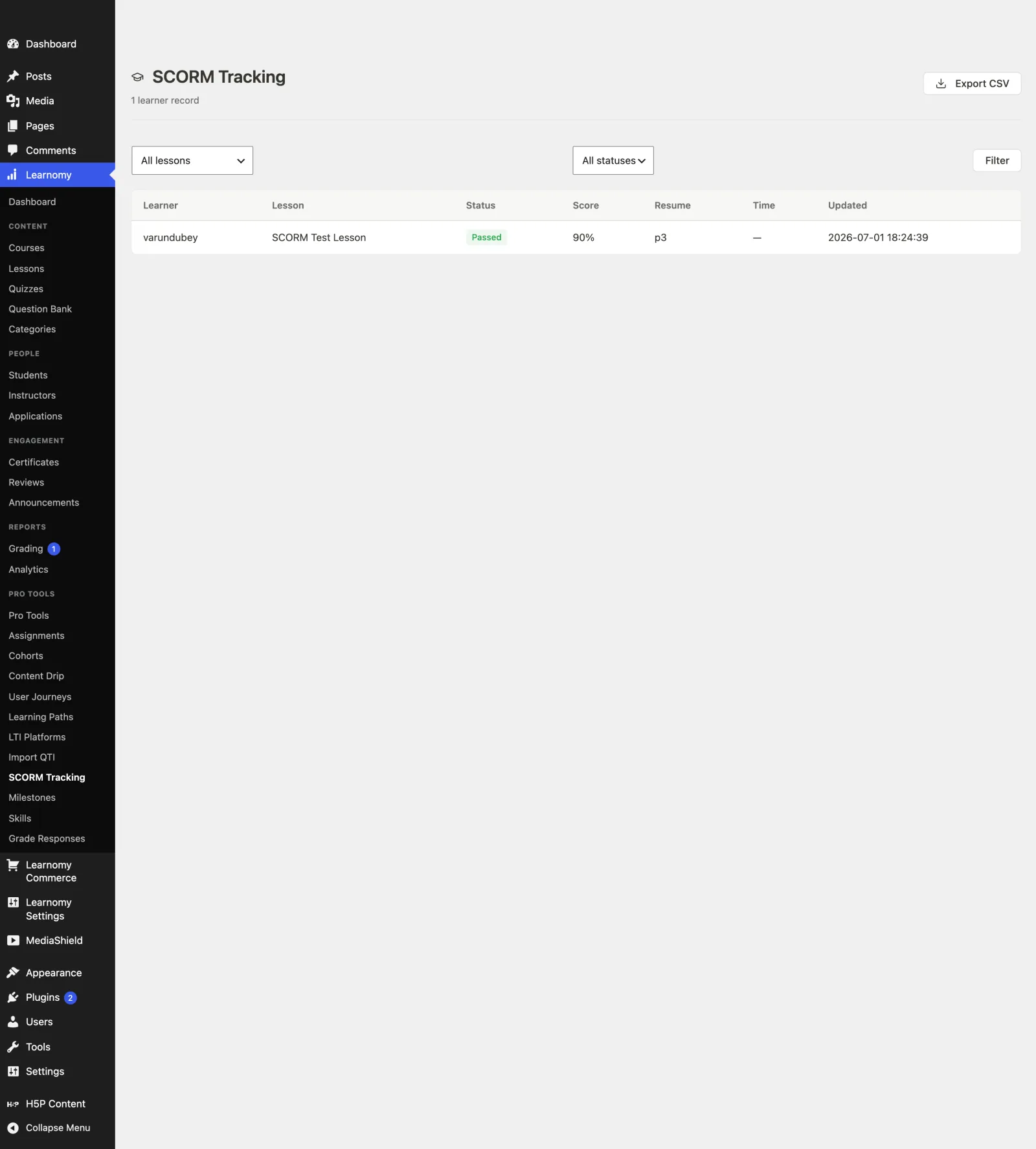
completion_mode = auto_standard) so a learner cannot advance until the package itself reports complete. - Track every learner's status, score, resume location, and time on task from a wp-admin report, and export it to CSV.
- Preview a SCORM lesson as an instructor or admin without touching a learner's tracking record.
How to use it#
SCORM is an opt-in module. It is never on by default, so the first step is to enable it.
- Go to Learnomy Settings > Modules and enable SCORM (listed under Integrations). Nothing SCORM-related loads until this is on.
- Open the lesson you want to hold the package (Learnomy > Lessons, or create a new one) and set its content type to SCORM.
- Save the lesson first. The uploader only appears once the lesson exists, because the package is stored against the lesson id. On an unsaved lesson you will see "Save the lesson first, then upload a SCORM package here."
- In the SCORM package field, click Upload a SCORM package (.zip) (or drag a
.ziponto the dropzone). The uploader validates the file, then the server reads itsimsmanifest.xml. - On success the field shows a summary card: the detected version (SCORM 1.2 or SCORM 2004), the launch file, and the number of SCOs. Use Replace to swap in a new package later.
- Publish the lesson. Enrolled learners open it in the lesson player and the package runs in a sandboxed runtime. Their progress, bookmark, and score are saved as they go and restored on their next visit.
- (Recommended for compliance) Set the lesson Completion mode to Auto: SCORM / standards package. Mark Complete stays disabled until the package reports a completing status for that learner. This mode is available in both the wp-admin lesson editor and the Pro front-end builder. See Sections and Lessons.
- To see results, go to Learnomy > Pro Tools > SCORM Tracking. Filter by lesson or status, page through learners, and use the export link for a CSV.
You can also upload the package from the Pro front-end course builder and through the REST API (see For developers). All three surfaces attach the package to the same lesson.
Settings and options#
- SCORM module (
Learnomy Settings > Modules) - the on/off switch for the whole feature. Category: Integrations. It requires Learnomy Pro. - Supported versions - SCORM 1.2 and SCORM 2004. The version is detected from the package manifest; other standards (for example AICC) are not supported here.
- Content type -
SCORMis added as a selectable lesson content type in the wp-admin lesson editor, the Pro front-end builder, and the API. - Maximum package size - defaults to 100 MB. Change it with the
learnomy_scorm_max_package_mbfilter (return the limit in MB). The uploader enforces the same limit client-side before the upload starts. - Tracking report access - the SCORM Tracking report is limited to users who can
manage_options(the site owner), because it holds per-learner data. Widen who can see it with thelearnomy_scorm_report_capfilter. - Tracking report (
Learnomy > Pro Tools > SCORM Tracking) - per-learner rows showing status (colour-coded: green for passed/completed, amber for in progress, red for failed), score, resume location, time on task, and last-updated time. Filter by lesson and by status, paginated at 20 rows per page, with a nonce-protected CSV export. - Preview safety - an admin or instructor who is not enrolled can open and resume a SCORM lesson to check it, but their run is never written to a learner's tracking record. Only an enrolled learner's run is tracked.
Uploaded packages are stored in a hardened directory that refuses script execution, and their files are served only through a permission-checked route that verifies course access on every asset request. A package is never exposed at a public uploads URL.
For developers#
The SCORM module lives in Learnomy Pro at includes/extensions/scorm/. It stores one package per lesson (lrn_pro_scorm_packages) and one CMI state per learner-lesson (lrn_pro_scorm_cmi).
REST routes (namespace learnomy-pro/v1):
| Method | Route | Purpose | Gate |
|---|---|---|---|
POST |
/scorm/packages |
Import an uploaded package (multipart with lesson_id + file). |
Can manage the lesson's course. |
DELETE |
/scorm/packages |
Remove the lesson's package (row + files). | Can manage the lesson's course. |
GET |
/scorm/cmi |
Read the learner's stored CMI state (init + resume). | Can access the lesson's course. |
POST |
/scorm/cmi |
Persist the learner's CMI state on commit. | Must be enrolled in the lesson's course. |
Content server route - SCO assets stream through the path-based route /learnomy-scorm/{lesson}/{hash}/{file}, gated on course access via Permission_Engine. The {hash} is the package's storage hash, so replacing a package automatically busts cached asset URLs.
Action - learnomy_scorm_cmi_saved fires after each CMI commit with ( int $user_id, int $lesson_id, array $state ). The Pro Content_Standards_Bridge listens to it and routes a completing status into Free lesson progress, which is the single path that also drives course progress, certificates, and any learnomy_lesson_completed listeners.
Filters:
learnomy_scorm_max_package_mb- max package size in MB (default100).learnomy_scorm_report_cap- capability required to view and export the tracking report (defaultmanage_options).
The content type registers on the Free learnomy_lesson_content_types filter as scorm, so it participates in the standard lesson content-type pipeline rather than a parallel one.