
Learning Paths
Pro feature
🔶 Pro feature. Available in Learnomy Pro.
Learning Paths let you chain multiple courses into a curated, ordered sequence. A student enrolls in the path once and is automatically enrolled in every course step. If the path is sequential, the student cannot access step N+1 until all required steps before it are complete. Finishing the last required step issues a path-level certificate.
Overview
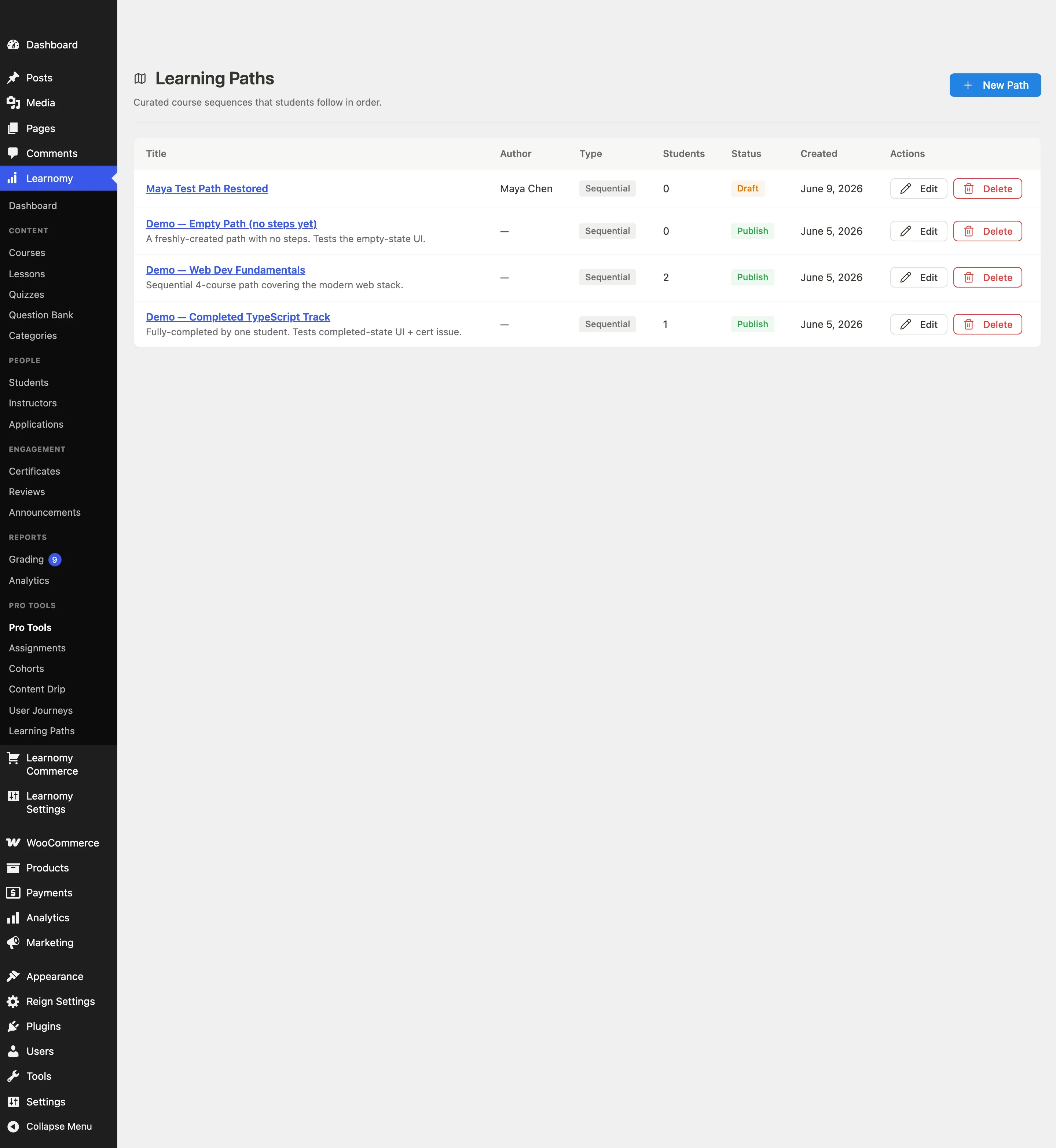
Go to Learnomy > Pro Tools > Learning Paths to see all paths. The list shows each path's title, number of steps, enrolled student count, and status.
Creating a learning path
Go to Learnomy > Pro Tools > Learning Paths and click New Path. A create form appears above the list.

Enter the path title, choose whether it is sequential or flexible, and set the status to Published when ready. Click Save. The new path appears in the table.
Click Edit next to the path to open the path editor. From there you can add course steps, reorder them with the Move up and Move down buttons, and mark steps as optional.
Set a Cover image for the path (added in 1.8.0). It works the same way as a course thumbnail: pick from the media library, and it appears in all three places a path is shown - the
/paths/catalog card, the single path page above the header, and the path row in the admin list. A path with no cover image falls back to a placeholder, so setting one is optional.
Once a path is published, it appears at /paths/ for students to browse and at /paths/{slug}/ to view and enroll. Note the public URL uses the path slug, not its numeric id.
Paths can also be created via the REST API. Send a POST to /learnomy-pro/v1/learning-paths with title, is_sequential, and status, then add steps via POST /learnomy-pro/v1/learning-paths/{id}/steps with course_id, sort_order, and is_required.
The student experience
A student visits
/paths/to browse the published paths catalog. Paths can be filtered by category and sorted by latest, most popular, or title.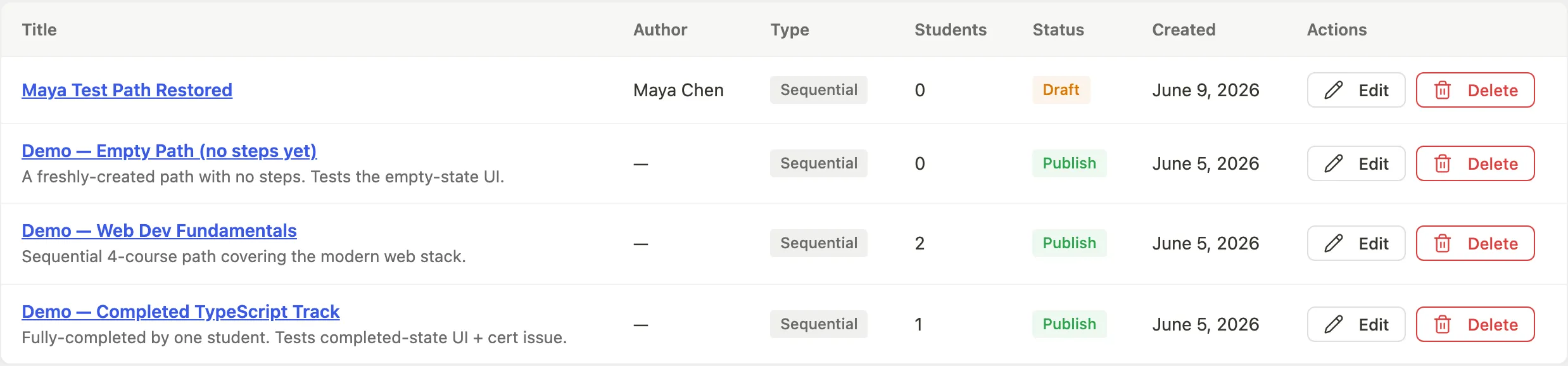
The student opens a specific path at
/paths/{slug}/. The page shows the path title, description, the list of course steps in order, and an Enroll button.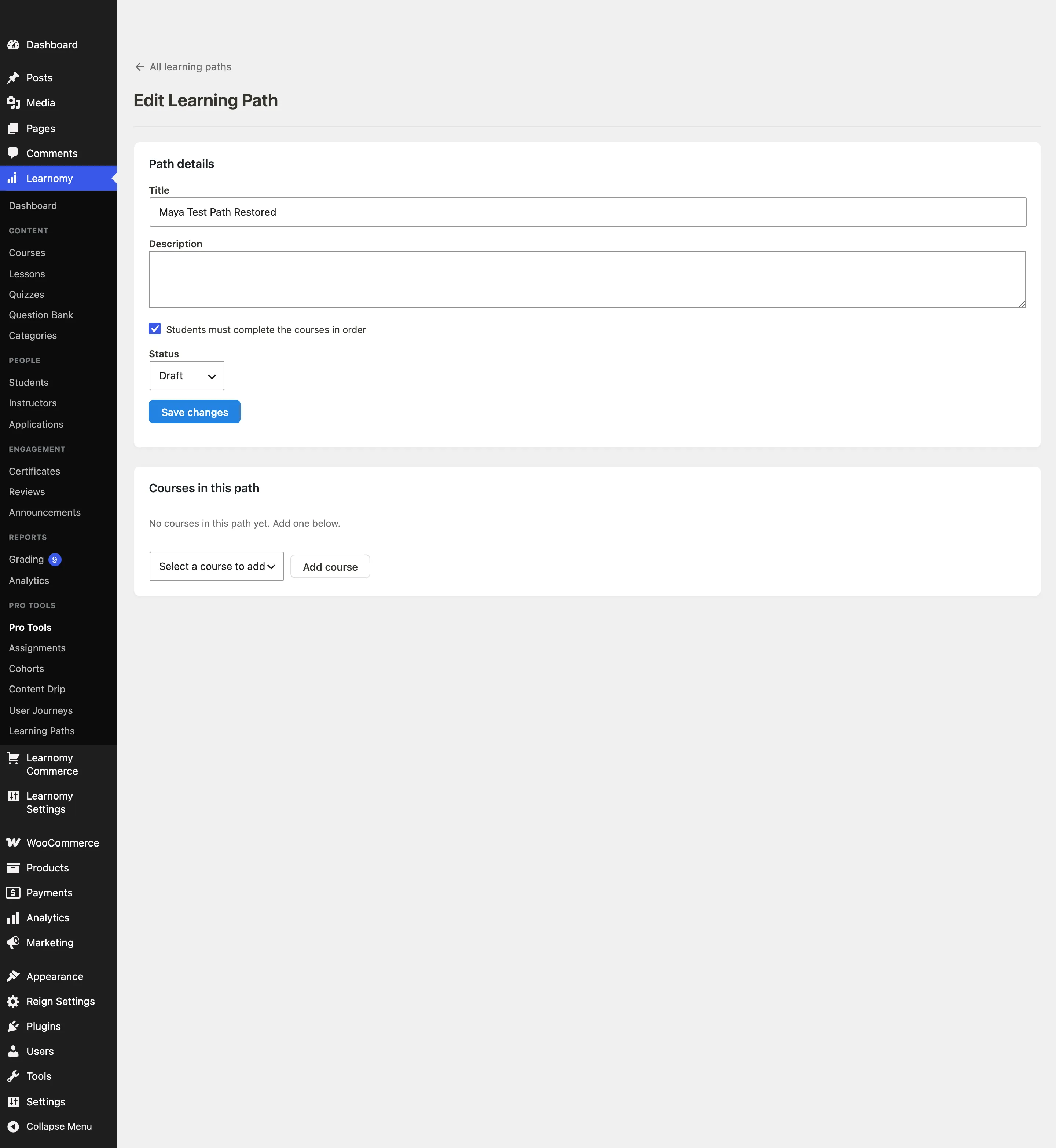
Clicking Enroll enrolls the student in the path and in every course step simultaneously. On a sequential path, the step tiles reflect which steps are locked and which are accessible.

When the student completes all required steps, the path is marked complete and a path-level certificate is issued automatically.
Sequential enforcement
When is_sequential is true, the access check refuses entry to a step until every earlier required step is marked complete. Optional steps (is_required: false) do not gate the next step and can be visited at any time.
Paid learning paths
A learning path can require payment. It checks out through Learnomy's normal unified checkout with purchase_type=learning_path and the path ID, using whichever payment gateway your site has enabled (WooCommerce, or Stripe/PayPal -- see Payment Gateways). After payment, the student is enrolled in the path and all its course steps. The learnomy_pro_learning_path_purchased action fires on successful purchase.
Steps that run in cohorts
A step can be a course that is delivered in cohorts. When a student reaches that step, they are enrolled in the course as normal:
- if the course has exactly one open cohort, they are placed into it automatically and get the cohort experience - the shared schedule, the group, and anything else that cohort carries
- if it has several open cohorts, they get access straight away and can pick a cohort from My Account -> Cohorts
- if it has no open cohort, the course behaves like any other step
Students never have to join a cohort by hand to continue a path they have already enrolled in.
When a step becomes unavailable
If you unpublish or archive a course that is a required step of a published path, that path stops accepting new enrollments. The path page tells visitors that part of it is unavailable, and shows no enrol button.
This is deliberate. A student who has not already taken that course cannot be enrolled in it while it is unpublished, so they could never finish the path and never earn its certificate. Rather than sell a path that cannot be completed, Learnomy declines the sale until you fix it.
Nothing else changes:
- the path stays published and stays in the catalogue
- students already enrolled keep the path and every course they already have access to
- their progress is untouched
The Learning Paths list in wp-admin flags any affected path with a warning telling you which action to take. You have two ways to clear it:
- republish the course — the path returns to sale immediately, with nothing else to do
- remove the step from the path — if the course is not coming back
Only you can know which of those is right, which is why Learnomy does not quietly drop the step or keep selling around it.
A path with no steps at all is handled separately: it never appears in the public catalogue in the first place.
Viewing path details in admin
The admin list shows the path title, step count, enrolled student count, and status. Click Edit to open a path and manage its steps.

Tips
- Drag-and-drop step reordering in the admin editor is planned for a future release. Use the Move up and Move down row actions to reorder steps in this release.
- Path-level prerequisites (paths that require completing other paths first) are planned for a future release.
- The path-level certificate reuses the certificate template system from Free. Assign a certificate template via the REST API when creating or updating the path.