
Course Reviews
Courses and ContentReviews let enrolled students rate a course from 1 to 5 stars and leave a short written review. Approved reviews feed the course's average rating and review count, which show on the course page and catalog cards.
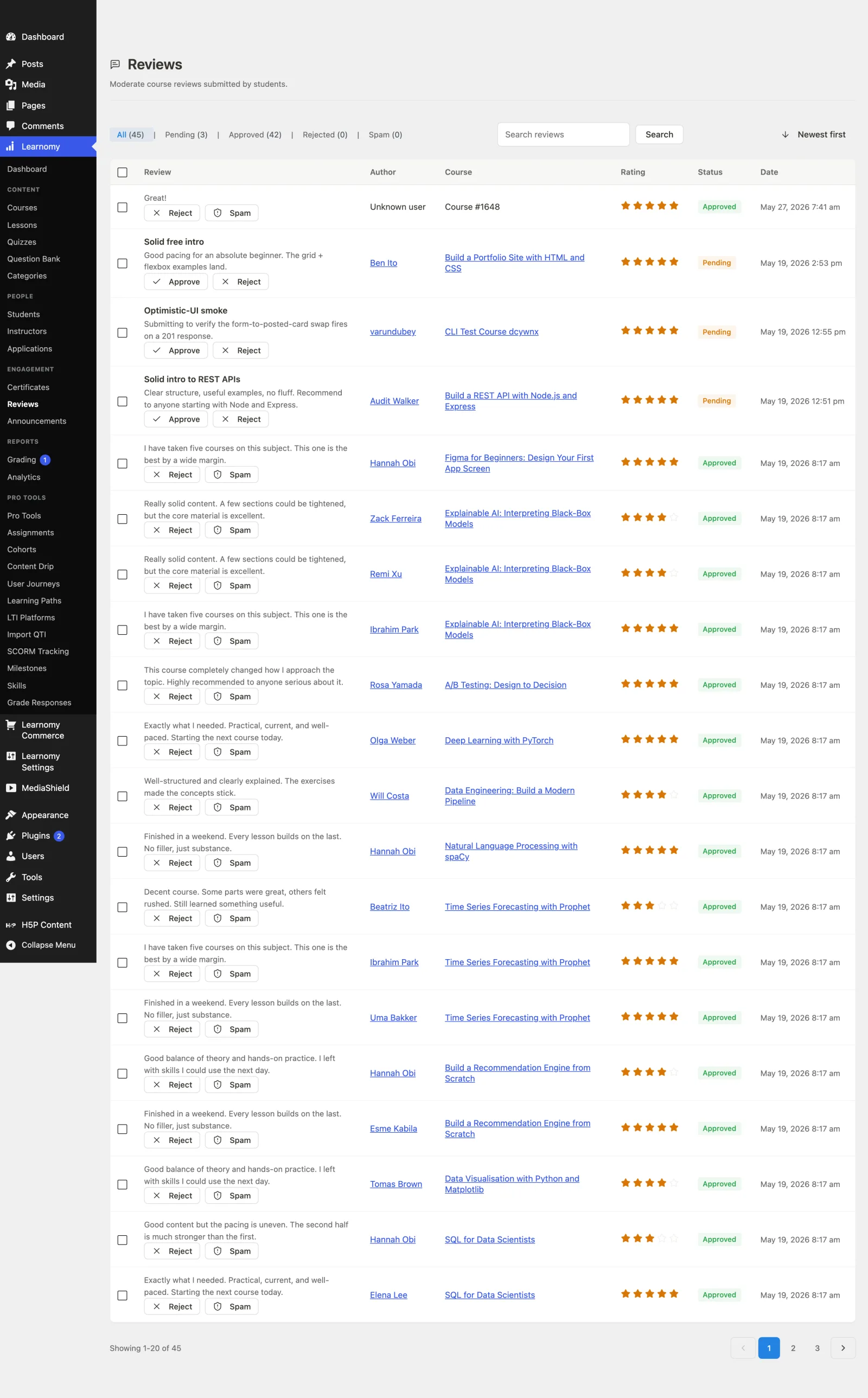
What you can do#
- Let enrolled students leave a star rating (1-5) with a title and a written review.
- Require a student to have completed at least one lesson before they can review, so reviews come from people who actually started the course.
- Allow only one review per student per course.
- Moderate reviews: approve, reject, or mark as spam from the admin Reviews screen, or auto-approve them site-wide.
- Let an instructor reply to a review.
- Keep the course's average rating and review count accurate automatically, recomputed whenever a review's status changes.
How to use it#
Step 1 -- turn reviews on#
Reviews show on a course page only when both gates pass: the Reviews module is on at Learnomy Settings > Modules, and the course's own reviews toggle is not switched off. This lets you disable reviews everywhere at once while each course keeps its own preference for later.
Step 2 -- a student leaves a review#
A signed-in student can submit a review only when all of these are true:
- They are enrolled in the course.
- They have completed at least one lesson in it.
- They have not already reviewed it.
They pick a star rating (1-5), add a title, and write the review. If any condition fails, the form is not offered and the submission is refused with a clear message.
Step 3 -- the review is moderated#
New reviews are held as pending by default, so nothing publishes without your say-so. Approve, reject, or mark reviews as spam from the admin Reviews screen. Turn on Auto-approve reviews in settings to publish new reviews immediately instead.
Step 4 -- ratings update automatically#
Only approved reviews count toward the average. Whenever a review is submitted, approved, rejected, marked spam, or deleted, Learnomy recomputes the course's average rating and review count, so the catalog and course page stay in sync without a cron pass.
Settings and options#
- Two-gate visibility. The site-wide Reviews module plus a per-course toggle. Both must allow it for the reviews surface to render.
- Auto-approve. Off by default -- fresh sites moderate reviews until you opt into auto-publish. When on, new reviews are approved on submission.
- One review per student. Enforced per (student, course); a student cannot stack multiple reviews on one course.
- Rating is clamped. The star rating is always stored within 1-5.
- Instructor reply. An instructor can attach a single reply to a review.
- Denormalized totals. Each course stores its own
avg_ratingandreview_count; these are the numbers shown on cards and the course page, and only approved reviews move them.
For developers#
Service (Learnomy\Services\Review_Service):
submit( $user_id, $course_id, $rating, $title, $content )-- enforces enrolled + one-lesson-done + not-already-reviewed, clamps the rating to 1-5, sets status toapprovedorpendingfrom the auto-approve setting, and recomputes the rating.approve()/reject()/spam()-- status flips from the moderation screen; each recomputes the course rating and fires its hook.reply( $review_id, $reply )-- store an instructor reply.recalculate_rating( $course_id )-- recomputeavg_ratingandreview_countfrom approved rows.Review_Service::auto_approve_enabled()-- reads theauto_approve_reviewssetting (default off).
Model gate: Course::reviews_enabled_for( $course_id ) -- the two-gate render check (site setting + per-course flag).
Hooks: learnomy_review_submitted, learnomy_review_approved, learnomy_review_rejected, learnomy_review_marked_spam.
REST (reviews controller): GET /learnomy/v1/courses/{course_id}/reviews (public list), POST /learnomy/v1/courses/{course_id}/reviews (submit, eligibility-gated), PATCH /learnomy/v1/reviews/{id}, plus admin status and bulk endpoints under /admin/reviews.