
Pages and URL Slugs
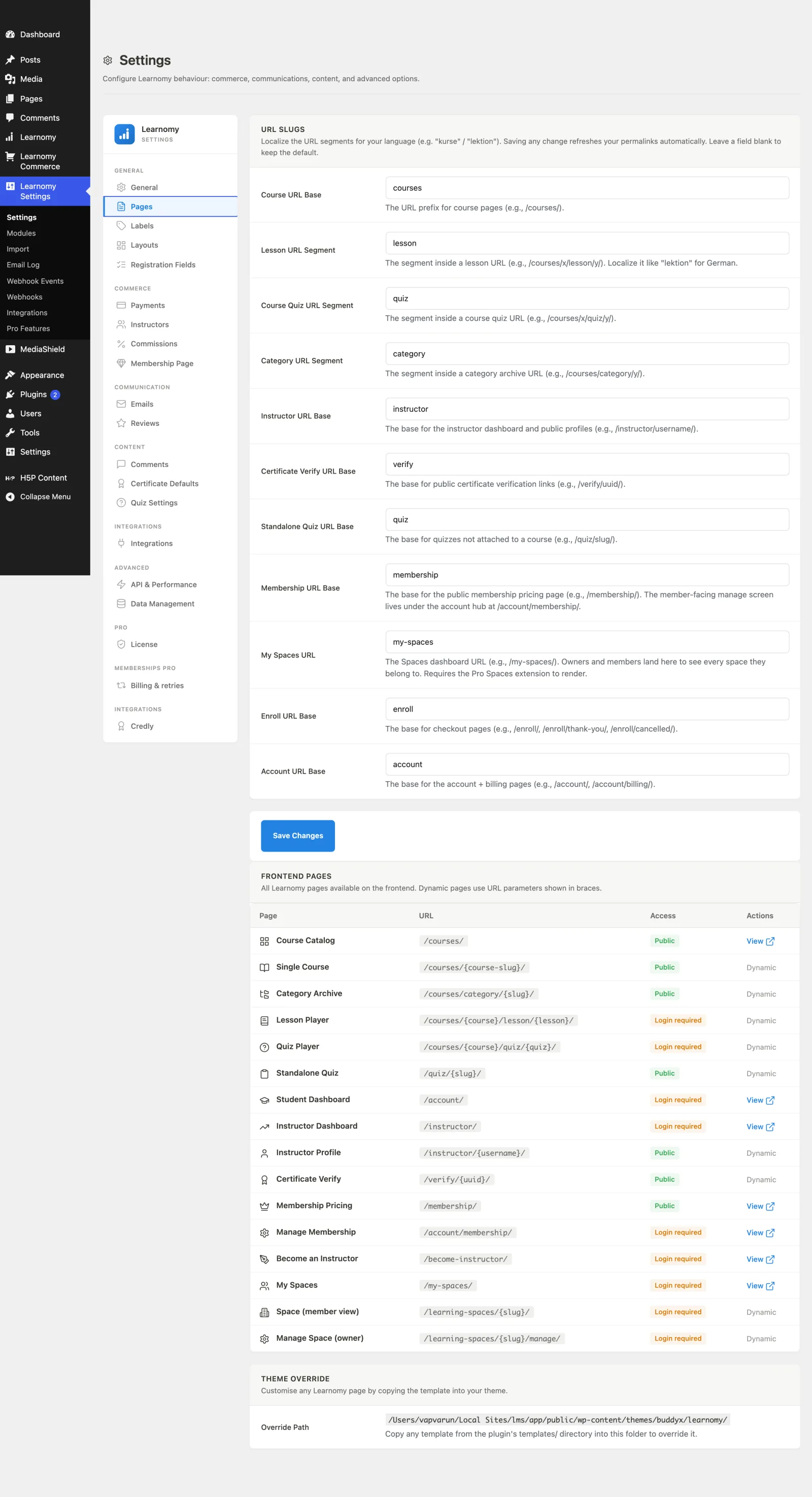
SettingsThe Pages section is where you localize or rename the URL segments for every Learnomy page, see the full list of frontend pages on your site, and find the folder to copy templates into for a theme override.
What you can do#
- Rename each URL segment (course base, lesson, quiz, category, instructor, and more) so links read in your language, for example
kurseandlektionfor German. - Change a slug and have Learnomy refresh your WordPress permalink rules automatically on save.
- See a read-only table of every Learnomy frontend page, its URL, whether login is required, and a View link for static pages.
- Leave any slug field blank to keep the built-in default.
- Find the exact theme folder to copy a template into when you want to override the markup.
How to use it#
Step 1 -- open Pages#
Go to Learnomy Settings and click Pages in the sidebar.
Step 2 -- edit the URL slugs#
In the URL Slugs card, change any segment you want to localize or rebrand. Leave a field blank to keep its default. The fields are:
- Course URL Base -- the prefix for course pages (default
courses). - Lesson URL Segment -- the segment inside a lesson URL (default
lesson). - Course Quiz URL Segment -- the segment inside a course quiz URL (default
quiz). - Category URL Segment -- the segment inside a category archive URL (default
category). - Instructor URL Base -- the base for the instructor dashboard, public profiles and, with Pro, the course builder (default
instructor). - Certificate Verify URL Base -- the base for public certificate verification links (default
verify). - Standalone Quiz URL Base -- the base for quizzes not attached to a course (default
quiz). - Membership URL Base -- the base for the public membership pricing page (default
membership). - My Learning Spaces URL -- the Learning Spaces dashboard URL (default
my-spaces; requires the Pro Spaces extension to render). - Enroll URL Base -- the base for checkout pages (default
enroll). - Account URL Base -- the base for every account page: details, billing, certificates and, with Pro, Notes & Bookmarks, Grades, Assignments, Cohorts, Paths and My Journey (default
account).
Step 3 -- save#
Click Save Changes. Saving any slug change automatically refreshes your permalink rules, so the new URLs work right away.
If another plugin already answers an address Learnomy uses (for example a marketplace plugin that claims every /account/... page), Learnomy shows a notice, Another plugin is answering Learnomy URLs, on its admin screens and in Tools > Site Health. When the clashing page sits under one of these bases, the notice tells you to change that base here. When it is a fixed address no setting moves, it tells you to turn off or reconfigure the other plugin instead.
Step 4 -- check the Frontend Pages table#
The Frontend Pages card lists every Learnomy page with its live URL, an access badge (Public or Login required), and a View link for static pages. Pages whose URL contains a placeholder in braces (for example {course-slug}) are marked Dynamic and have no direct View link.
Step 5 -- override a template (optional)#
The Theme Override card shows the folder path (your active theme's learnomy/ directory). Copy any file from the plugin's templates/ folder into that path and edit it there to customise the markup for that page.
Settings and options#
Every slug saves into the learnomy_settings option under its own key.
| Field | Option key | Default |
|---|---|---|
| Course URL Base | base_slug |
courses |
| Lesson URL Segment | lesson_slug |
lesson |
| Course Quiz URL Segment | quiz_slug |
quiz |
| Category URL Segment | category_slug |
category |
| Instructor URL Base | instructor_slug |
instructor |
| Certificate Verify URL Base | verify_slug |
verify |
| Standalone Quiz URL Base | standalone_quiz_slug |
quiz |
| Membership URL Base | membership_slug |
membership |
| My Learning Spaces URL | my_spaces_slug |
my-spaces |
| Enroll URL Base | enroll_slug |
enroll |
| Account URL Base | account_slug |
account |
The Frontend Pages table and Theme Override path are read-only; they have no save button.
The Legal card#
Below the URL slugs on the same tab is a Legal card with one field.
| Field | Option key | Default |
|---|---|---|
| Terms of Service page | terms_url |
empty (agreement off) |
Paste the full URL of the page members agree to when they sign up. Once it is set, the registration form asks every new member to agree before their account is created, and each agreement is recorded with the date, the pages that were shown, and the member's IP address. Your WordPress privacy policy page is included in that record automatically.
Leave the field blank and no agreement is requested at sign-up. There is no separate on/off switch: the field being empty is the off state.
Adding Learnomy pages to a navigation menu#
Learnomy's frontend pages are not WordPress pages, so they do not appear in the usual Pages box under Appearance > Menus. They get their own box instead: Learnomy Pages. Tick the pages you want, click Add to Menu, and they behave like any other menu item. The box is shown the first time you open the screen. If you hide it under Screen Options, turn it back on there.
What the box offers:
| Group | Items |
|---|---|
| Catalog | Course catalog |
| Account | My account, My Courses, Quiz attempts, Certificates, Order history, Account details, My Learning Spaces, Manage membership |
| Instructor | Instructor dashboard, Instructor Courses, Instructor Students, Instructor grading, Instructor earnings, Instructor profile |
| Sign-up | Membership pricing, Become an Instructor, Register as Student, Register as Instructor |
Two things the box does deliberately:
- It only offers pages that have a fixed address. A course or lesson URL needs a specific course, so those are not listed -- link to an individual course the way you would link to any other URL. Flow steps such as the checkout, thank-you and cancelled pages are absent for the same reason nobody would link to them: they are stages in a purchase, not destinations.
- It hides pages belonging to a switched-off module. With the membership module off, Membership pricing and Manage membership do not appear, because those addresses 404 and a menu item pointing at one looks identical to a working one until a visitor clicks it.
Menu items you already built keep working after any of this: the items store a route, not a hardcoded URL, so changing a slug in the table above moves the menu item with it.
When another plugin answers a Learnomy URL#
Most LMS plugins want the same addresses Learnomy wants. Tutor LMS, LearnDash and
LifterLMS all publish a course archive, and the default address for all of them
is some form of /courses/. WordPress does not arbitrate: it serves whichever
rule was registered first, so with two LMS plugins active your course catalog can
quietly become the other plugin's archive.
The same thing outlives the other plugin. WordPress only rebuilds its URL rules
when permalinks are refreshed, so a plugin that is deactivated or deleted without
that refresh leaves its rules behind, still owning the address. The symptom is
distinctive: /courses/ shows your blog posts, while single course pages such as
/courses/my-course/ still work.
Learnomy watches for both.
- A rule left behind by a plugin that is gone is repaired automatically. The next time you open a Learnomy admin page, Learnomy refreshes the URL rules once and your catalog comes back. You do not have to do anything.
- A collision with a plugin that is still active is reported, not resolved. You get a notice on Learnomy admin screens and a Site Health check naming the address and what is answering it. Learnomy will not take the address for itself, because doing so would break the other plugin's pages and only you know which one should win.
To settle a live collision, either change Course URL Base above to something
free (academy, training, kurse) or turn off the other plugin. Either way
the notice clears on its own.
Site Health carries a permanent check for this: Tools -> Site Health -> Status, under Learnomy course URLs. It is green when every Learnomy address - catalog, courses, lessons, quizzes and the account pages - reaches Learnomy.
For developers#
Every slug is also exposed as a filter, so you can set it in code instead of the UI. The filter wins over the saved setting.
learnomy_base_slug,learnomy_lesson_slug,learnomy_quiz_slug,learnomy_category_slug,learnomy_instructor_slug,learnomy_verify_slug,learnomy_standalone_quiz_slug,learnomy_membership_slug,learnomy_my_spaces_slug,learnomy_enroll_slug,learnomy_account_slug-- one filter per slug (see\Learnomy\reslug_keys()inincludes/functions.phpfor the full map).- Slugs feed the declarative Route Registry in
includes/class-routes.php, which is the single source for both the rewrite rules and URLs. Build every front URL with\Learnomy\route_url( $name, $args )-- never hardcodehome_url('/courses/...'). learnomy_routes-- filter for registering additional routes (Pro extensions use this soroute_url()can build their URLs too).learnomy_nav_menu_pages-- filter (arrayof['key','label','url']) for the rows offered in the Learnomy Pages navigation-menus box. Pro extensions append their own pages through it, so the box stays a single source of truth rather than each extension adding a box of its own.learnomy_route_conflict_force_ownership-- returntrueto move every Learnomy rewrite rule ahead of every other plugin's in the final rules table. Off by default: it wins the address at the cost of the other plugin's, which is a decision for the site owner rather than for us.\Learnomy\Services\Route_Conflicts::detect()returns the current verdict, andcheck_now()re-runs it on demand.