
Closed Course Pricing
Courses and ContentClosed pricing is for courses you do not sell on your Learnomy site. The course is priced and paid for somewhere else -- your own checkout, Gumroad, a CRM, a sales team -- and you grant access to Learnomy after the sale. There is no Buy button and no on-site checkout.
What you can do#
- Run a course that is never purchasable on your Learnomy site, with every price tag and Buy button removed from the course page and the catalog.
- Grant access by hand from the course's Students screen, one email at a time or by CSV upload.
- Grant and revoke access automatically from an outside platform through the incoming enrollment webhook.
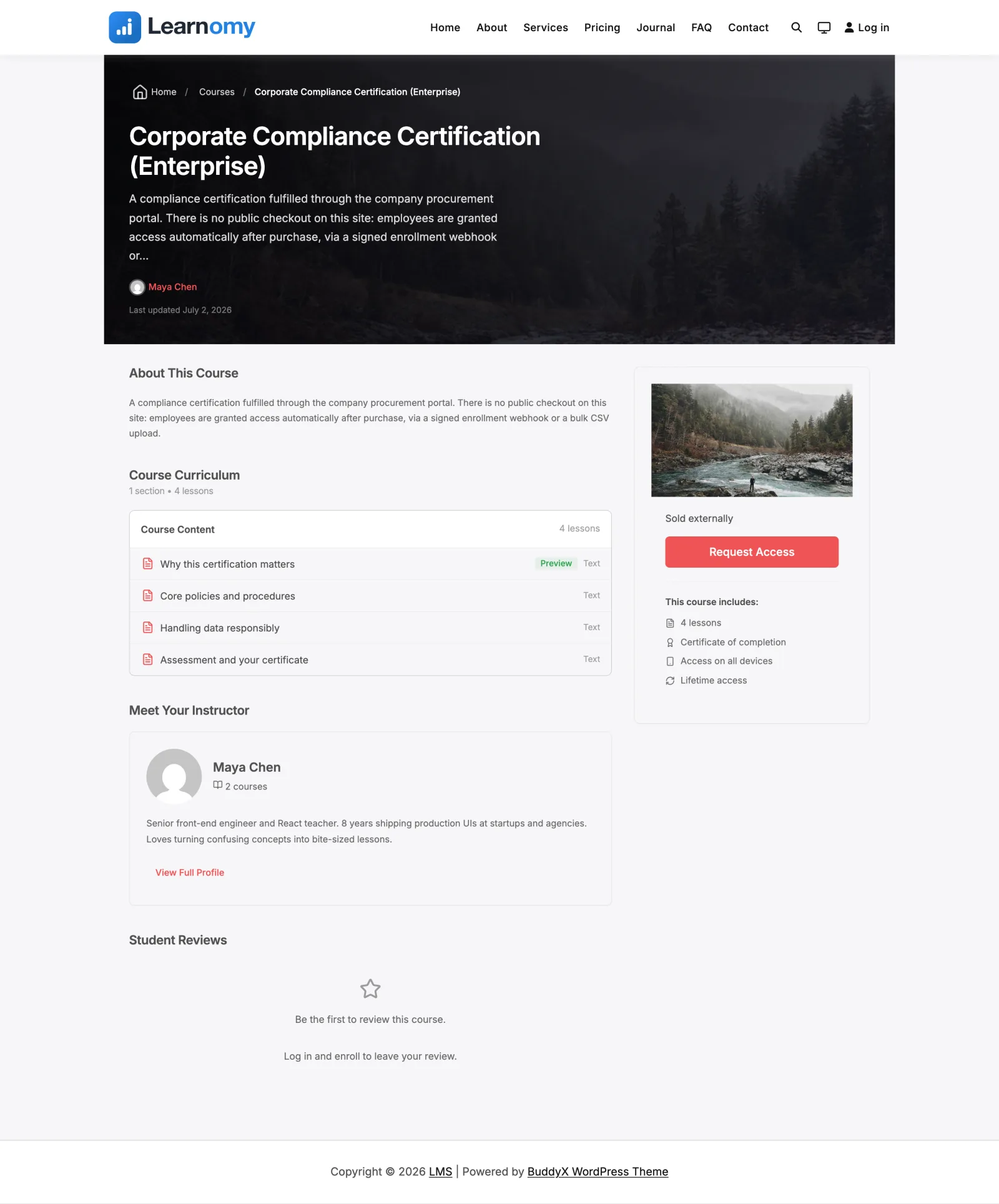
- Show an optional "Request Access" style button on the course page that links to wherever the course is actually sold.
- Show a plain "Enrolment is managed externally" note instead of a button when you would rather not link out.
- Use closed pricing without turning on the payments or membership modules -- it is always available.
How to use it#
Step 1 -- open the course pricing settings#
Edit the course and open the Pricing & Access section of the course editor. You will see the Pricing model radio group.
Step 2 -- choose the closed model#
Select Access granted externally (no on-site checkout). This is the option LearnDash users know as "Closed." Unlike the paid and members-only models, it is always listed -- it does not require the payments or membership module to be enabled, because the whole point is that no on-site sale happens.
When you pick it, the regular price, sale price, and access-duration fields disappear, because they do not apply to a course that is not sold here.
Step 3 -- set an optional button (recommended)#
Two optional fields appear under the closed model:
- Custom button label -- the text on the button shown on the course page, for example
Request AccessorBuy on Gumroad. If left blank it falls back to "Enrol externally." - Custom button URL -- where that button links, for example your external checkout or a contact form.
If you set a URL, the course page shows the button linking out to it (opening in a new tab). If you leave both blank, the course page shows a plain "Enrolment is managed externally" note instead.
Step 4 -- read the access summary and save#
The editor shows a one-line, plain-English summary of what a visitor will experience, composed from the visibility and pricing model you chose. For a closed course it explains that students cannot buy it here and that you grant access by email, CSV upload, or a connected external system. Confirm it reads the way you expect, then save.
Step 5 -- get students in#
A closed course has no self-serve enrollment, so you decide who gets in. There are two ways:
- Manually or by CSV -- open the course's Students screen and add students by email or upload a CSV list.
- From an external system -- connect your checkout, Gumroad, a CRM, or Zapier/Make to the incoming enrollment webhook on Learnomy Settings -> Webhooks (Incoming access panel), so buyers are enrolled automatically after they pay elsewhere. See Incoming Access Webhook.
Until at least one student is enrolled, the course detail screen shows a reminder banner that the course is set to external access but has no students yet, with a pointer to both paths.
Settings & options#
The Pricing & Access section of the course editor:
| Field | What it is |
|---|---|
| Pricing model: Access granted externally (no on-site checkout) | The closed model. Always available, no module required. Stored in both pricing_model and access_type as closed (varchar reuse, no schema change). |
| Custom button label | Optional. Stored in the course settings_json as closed_cta_label. Falls back to "Enrol externally" when a URL is set but no label. |
| Custom button URL | Optional. Stored as closed_cta_url. When set, the course page renders the CTA button; when blank, a plain "Enrolment is managed externally" note is shown. |
| Access summary | Read-only live sentence describing what a student experiences, built from visibility + pricing model. |
What a closed course does everywhere else:
- Course page -- the price area shows "Sold externally" instead of a price. The Buy / Enroll button is replaced by your external button or the managed-externally note.
- Catalog -- the course card and price facet suppress the price, so a closed course never shows a price it cannot honor.
- Checkout -- the on-site checkout (and the test checkout) refuse a closed course, so nobody can reach a pay flow for it.
For developers#
Model (Learnomy\Models\Course):
Course::is_closed( $course )-- true when the resolvedpricing_modelisclosed. This is the single branch every buy/price surface checks.Course::PRICING_MODELS/Course::ACCESS_TYPES-- the canonical option lists, both includeclosed. UseCourse::model_for_access()/Course::access_for_model()to convert between the two vocabularies; never hardcode the map.Course::get_setting( $course_id, 'closed_cta_url', '' )/... 'closed_cta_label', '' )-- read the custom CTA fields fromsettings_json.Course::access_summary( $course )-- the plain-English summary string.
Filters:
learnomy_closed_cta-- override the entire closed-course CTA HTML on the course page (the external button or the managed-externally note). Passed the default HTML, the course row, and the current user id.learnomy_bulk_enroll_max-- cap on how many rows a single CSV / paste bulk enroll accepts.
REST:
POST /learnomy/v1/admin/courses/{id}/bulk-enroll-- admin bulk enroll for closed courses (manual source, deduped, provisions new accounts, capped bylearnomy_bulk_enroll_max).POST /learnomy/v1/webhooks/enrollment-- the public incoming enrollment trigger for closed courses (mandatoryX-Learnomy-Signature). See Incoming Access Webhook for the full contract.
Not to be confused with Invite only#
Closed and Invite only share the same access rule -- nobody enrols themselves and nothing is sold on-site. Use Closed when the course is still bought somewhere else and you want to link there. Use Invite only when there is no sale at all and you add the students yourself, as in internal training.