
Admin Tour
Free & ProAfter activating Learnomy, three top-level menus appear in the WordPress admin sidebar. Each menu has a single job: running the academy, managing money, or configuring the system. This page explains what lives in each one.
Overview
The three menus are kept together as a contiguous block in the sidebar, positioned at menu slots 30, 30.1, and 30.2. They stay grouped even when other plugins shift the menu order. Menu labels and icons are filterable, so the white-label module can rename them without breaking any URL.
Learnomy -- run the academy
The top-level Learnomy menu holds everything you need to build and manage courses, handle students, and track content.
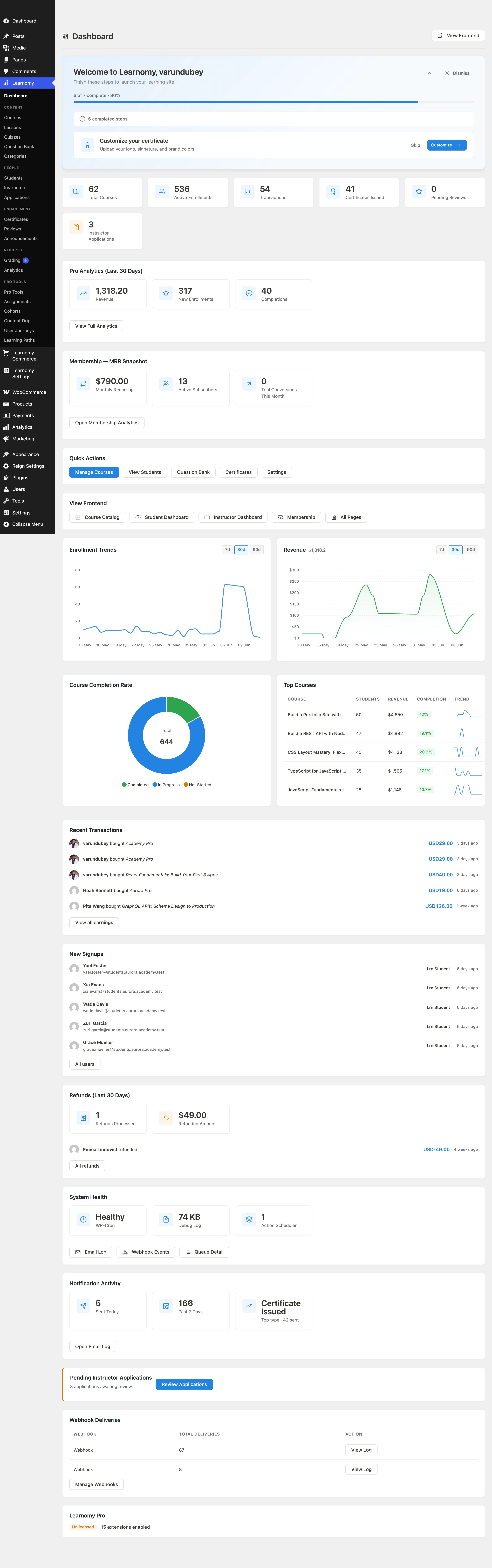
The submenu items are:
| Page | What it does |
|---|---|
| Dashboard | Academy-wide stats, trend charts, recent activity, and top courses. Landing page after login. |
| Courses | List of all courses. Create, edit, delete, and set pricing. |
| Lessons | All lessons across every course. Filter by course to find a specific lesson quickly. |
| Quizzes | Quiz list and question bank. Only visible when the Quizzes module is enabled. |
| Question Bank | Reusable question library organized by category. Visible when Quizzes is enabled. |
| Grading | Inbox of submitted quiz attempts that contain essay or manually graded responses. Shows a count badge when there are pending items to grade. Visible when Quizzes is enabled. |
| Students | Student list with enrollment counts and last-active dates. Drillable to a per-student detail page. |
| Instructors | Instructor accounts and the application queue, as two tabs on one screen. Admin-only. Hidden entirely in solo academy mode, where the owner is the only instructor. |
| Certificates | Issued certificates with verify links. Only visible when the Certificates module is enabled. |
| Categories | Course category tree (hierarchical). Also used for Learning Path categories in Pro. |
| Reviews | Course review moderation. Always visible so pending reviews can be cleared even if the public review form is disabled. |
| Reported Content | The moderation queue for reviews, comments, and courses that members have flagged. Shows a count badge when there is an open backlog. |
| Announcements | Site-wide or course-specific announcements sent to students. Visible when the Notifications module is enabled. |
| Analytics | Academy-wide reporting, enrollment funnels, and revenue charts. Pro only. |
| Gradebook | Weighted per-course grades built from quizzes, assignments, and SCORM packages, with a per-student grid and CSV export. Pro only, under the Reports section. |
| Pro Tools | The launcher for every Pro extension page: Assignments, Cohorts, Content Drip, Learning Paths, User Journeys, Milestones, Skills, LTI Platforms, Import QTI, and SCORM Tracking each live one card away. These pages do not have their own sidebar rows, which keeps the menu short; their direct URLs still work and can be bookmarked. Only visible when Learnomy Pro is active. |
The menu is grouped under small section labels so related pages sit together. Keeping the row count down is deliberate: WordPress flyout menus do not scroll, so anything past the bottom of the screen would be unreachable. That is why the Pro extension pages collapse into a single Pro Tools row instead of taking a row each.
| Section | Pages |
|---|---|
| (top) | Dashboard |
| Content | Courses, Lessons, Quizzes, Question Bank, Categories |
| People | Students, Instructors |
| Engagement | Certificates, Reviews, Reported Content, Announcements |
| Reports | Grading, Analytics, Gradebook |
| Extensions | Pro Tools |
The Grading submenu shows a number badge (the yellow circle) when there are attempts waiting for manual review. It disappears once all pending submissions are graded. Reported Content shows the same style of badge when the moderation queue has an open backlog.
Some pages are deliberately kept out of the sidebar and are reached from the screen that owns them: the course builder and the course, lesson, quiz and question editors, the certificate designer, the setup wizard, the per-student and per-instructor detail pages, Applications (now the second tab on Instructors), and Grade Responses (reached from Grading). They all still have working, bookmarkable URLs.
LMS Commerce -- money
The LMS Commerce menu only appears when at least one commerce module is enabled (Membership, Commissions, or Coupons), or when Learnomy Pro forces it on via a filter. If none of those modules are active and Pro is not installed, this menu is hidden.
This menu is grouped into four sections:
| Section | Page | What it does |
|---|---|---|
| (top) | Overview | Revenue summary: total earnings, active subscriptions, and recent transactions at a glance. |
| Sell | Memberships | Membership plan list. Create and configure recurring billing plans. |
| Sell | Subscriptions | Active and expired subscriber list. Drillable to a per-subscription detail page carrying that subscription's payments. See Subscriptions. |
| Sell | Coupons | Discount code management. Set fixed or percentage discounts, usage limits, and expiry dates. |
| Sell | Space Plans | Pricing plans for learning spaces - what an organization pays for seats. Pro only. The row reads "Space Plans" by default; rename "Space" to "Team" and it becomes "Team Plans". It deliberately does not follow the default label, which would make it the longer "Learning Space Plans". |
| Money | Earnings | Instructor earnings ledger. Shows per-instructor revenue splits and pending withdrawal balances. |
| Money | Transactions | Full transaction log with provider reference, amount, and status. |
| Money | Refunds | The subset of completed membership payments not yet refunded, so you do not have to hunt for them in the full log. Each row has its own refund button. Pro only. |
| Money | Stripe Payouts | Manage Stripe Connect payouts to instructors. Pro only. |
| Teams | Learning Spaces | Learning spaces and their seat usage. Pro only. This row does follow your Space label, so renaming "Space" to "Team" makes it read "Teams". |
| Reports | Membership Stats | Detailed MRR, churn, and LTV charts. Pro only. |
Gift Codes (Pro, with Memberships) also lives on this menu, under Sell.
Spaces and Space Plans move menus depending on what your site does. Once at least one space plan is active - that is, once you sell seats - both sit under LMS Commerce as above. A draft plan does not move them. Before then they sit under the main Learnomy menu, so an owner running teams without selling anything never has to open a commerce menu, and the screen that creates the first plan is reachable on a site with no commerce at all. The page slugs never change, so a bookmark resolves either way.
The per-record detail and editor screens - Edit Membership Plan, and the single Subscription, Transaction, Withdrawal and Coupon pages - have no sidebar rows. You reach them by clicking a row in the list above them, and their URLs are bookmarkable.
Enabling or disabling the Membership module from the Modules page immediately shows or hides the Commerce menu on your next page load.
Learnomy Settings -- config and system
The Learnomy Settings menu holds configuration and system pages. These are site-owner pages; day-to-day course management lives in the Learnomy menu instead.
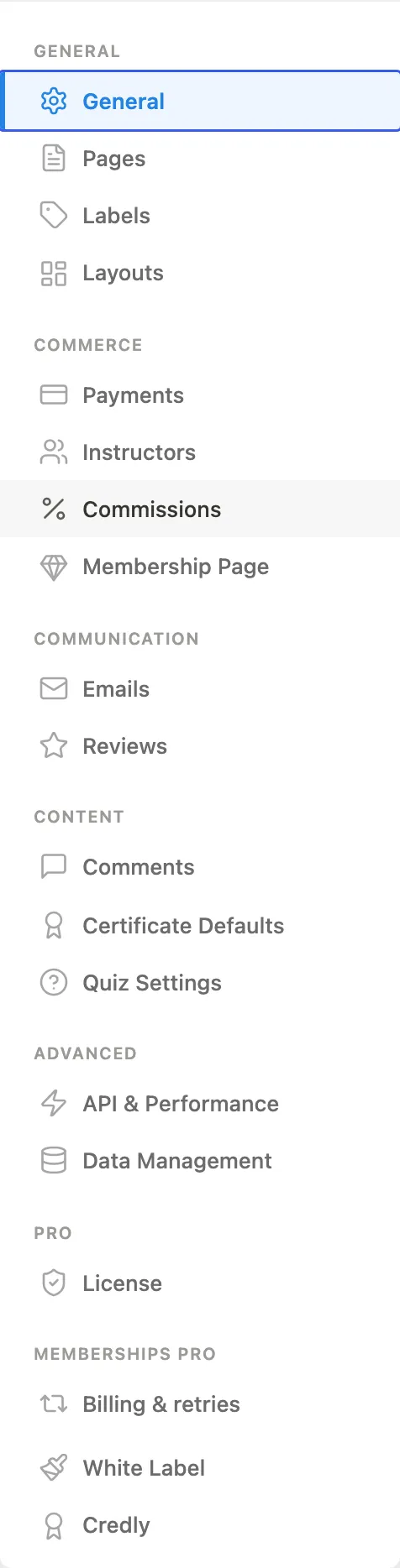
Like the other two menus, this one is grouped under section headers - Configure (Settings, Modules, Import), Logs (Email Log, Payment Log, Outgoing Webhooks) and Add More (Companion Plugins, What's in Pro) - because there are three different reasons to open it: configure the product, read what it did, or get more of it. Import sits under Configure rather than beside the logs; it is a one-off setup action, not a record of anything.
| Page | What it does |
|---|---|
| Settings | The settings page. Its left-hand navigation is grouped: General (General, URLs & Pages, Labels, Layouts, Registration Fields), Commerce (Payments, Instructors, Commissions, Membership Page), Communication (Emails, Reviews), Content (Course Comments, Certificate Defaults, Quiz Settings, Learning Standards), Advanced (API & Performance, Data Management), and License once Pro is active. A tab only appears when the module behind it is enabled, and Pro extensions register their own tabs into these same groups rather than adding groups of their own. |
| Modules | Toggle features on and off. Required modules are locked; all others are optional. |
| Import | Bring courses in from another LMS or from a previous export. |
| Email Log | History of every notification email sent by Learnomy, with delivery status. Under Logs, alongside Payment Log and Outgoing Webhooks. Visible when the Notifications module is enabled. |
| Payment Log | Log of every webhook Learnomy receives from Stripe or PayPal, with outcome and a replay button. Visible when the Payments module is enabled. |
| Outgoing Webhooks | Configuration for the webhooks Learnomy sends. Point them at your own systems to be notified when LMS events fire. |
| Companion Plugins | One-click install and activate for the plugins Learnomy works with. |
| What's in Pro | A catalog showing all Free and Pro modules side by side with tier badges (FREE / PRO) and status labels (Stable / Beta). Useful for seeing what Pro adds before purchasing. |
Payment Log and Outgoing Webhooks sit next to each other on purpose, and their names are the only thing that tells them apart: one is inbound, one is outbound. Payment Log also reads as a pair with Email Log. The delivery log for an individual outgoing webhook has no sidebar row - open it from Outgoing Webhooks.
Tips
- Bookmarks still work. These menus have been reorganized and relabelled more than once, most recently in 1.9.4 (Payment Webhook Log became Payment Log, Membership Analytics became Membership Stats, Refundable Transactions became Refunds, Learning Space Plans became Space Plans, Applications became a tab on Instructors, and Learnomy Settings gained its section headers). No page slug - the
?page=part of the URL - has ever changed in any of those moves, so every bookmark you have saved still resolves to the right page. Expect the labels to keep improving; the URLs will not. - Your own words show up here too. Courses, Lessons, Quizzes, Categories, Students, Instructors, Spaces and Space Plans are not fixed strings - each row prints whatever you typed in Learnomy Settings > Labels. Rename "Course" to "Class" and the sidebar says Classes. See Custom Labels.
- Module gating. If you visit a Commerce page URL when all commerce modules are disabled, Learnomy redirects you to the Modules page with a notice, rather than showing a blank 403 screen.
- White-label. When the Pro white-label module is active, the word "Learnomy" in all three menu labels can be replaced. The "Commerce" and "Settings" suffixes survive the rename.