
Custom Labels
SettingsThe Labels section lets you rename Learnomy's core nouns across your whole site without writing any code. Change "Course" to "Class", "Lesson" to "Module", "Student" to "Learner" or "Instructor" to "Coach", and the new words appear everywhere Learnomy names that thing.
Where a rename reaches#
A rename is not a front-end skin. One resolver answers every surface, so the word you type replaces the built-in one in all of these:
| Surface | What changes |
|---|---|
| Front end | Catalog, course, lesson and quiz pages, the student and instructor dashboards, account screens, buttons, and empty states. |
| wp-admin | The admin sidebar rows themselves - Courses, Lessons, Quizzes, Categories, Students, Instructors, plus Pro's Spaces and Space Plans - along with page headings, settings tab labels, column headers, help text, and notices. |
| Emails | Automated notification subjects and bodies. |
| Browser and SEO titles | The <title> on Learnomy's own pages, plus the descriptions and structured data the SEO module emits. |
| Block editor | Learnomy block panel titles and control labels in the editor sidebar. |
| JavaScript strings | Confirmation dialogs, toasts, and inline validation messages. |
Two things deliberately do not change, and both are load-bearing:
- URLs. The
/courses/segment of your permalinks stays as it is, so a rename never breaks a link, a bookmark, or a search result you already rank for. Edit the slugs yourself under Learnomy Settings > URLs & Pages if you want the URL to follow the new wording. - WP-CLI output, the REST API schema and role slugs. These are machine-facing identifiers and contracts, not copy. The role names shown in the WordPress Users screen, Student and Instructor, do follow your labels.
What you can rename#
| Noun | Default singular | Default plural |
|---|---|---|
| Course | Course | Courses |
| Lesson | Lesson | Lessons |
| Quiz | Quiz | Quizzes |
| Section | Section | Sections |
| Topic | Topic | Topics |
| Category | Category | Categories |
| Student | Student | Students |
| Instructor | Instructor | Instructors |
| Learning Space (Pro) | Learning Space | Learning Spaces |
The people nouns matter more than they look. Most sites are not academies: corporate training has trainees and trainers, coaching platforms have clients, associations have members and mentors. Renaming Course while the registration page still says "Register as a Student" only half-renames your site.
Learning Space appears only when Learnomy Pro is active with Spaces enabled, because Pro registers it. Its default is "Learning Space", not "Space", so switching Learnomy on does not rename anything you already had.
What you can do#
- Rename each entity to your own vocabulary using a singular and a plural field.
- Leave any field blank to keep the built-in default name.
- Apply your labels site-wide with no code and no template edits - front end, wp-admin, emails, page titles and the block editor all follow.
- Keep the defaults for translation instead: use a
.potranslation file when you want another language rather than a rename.
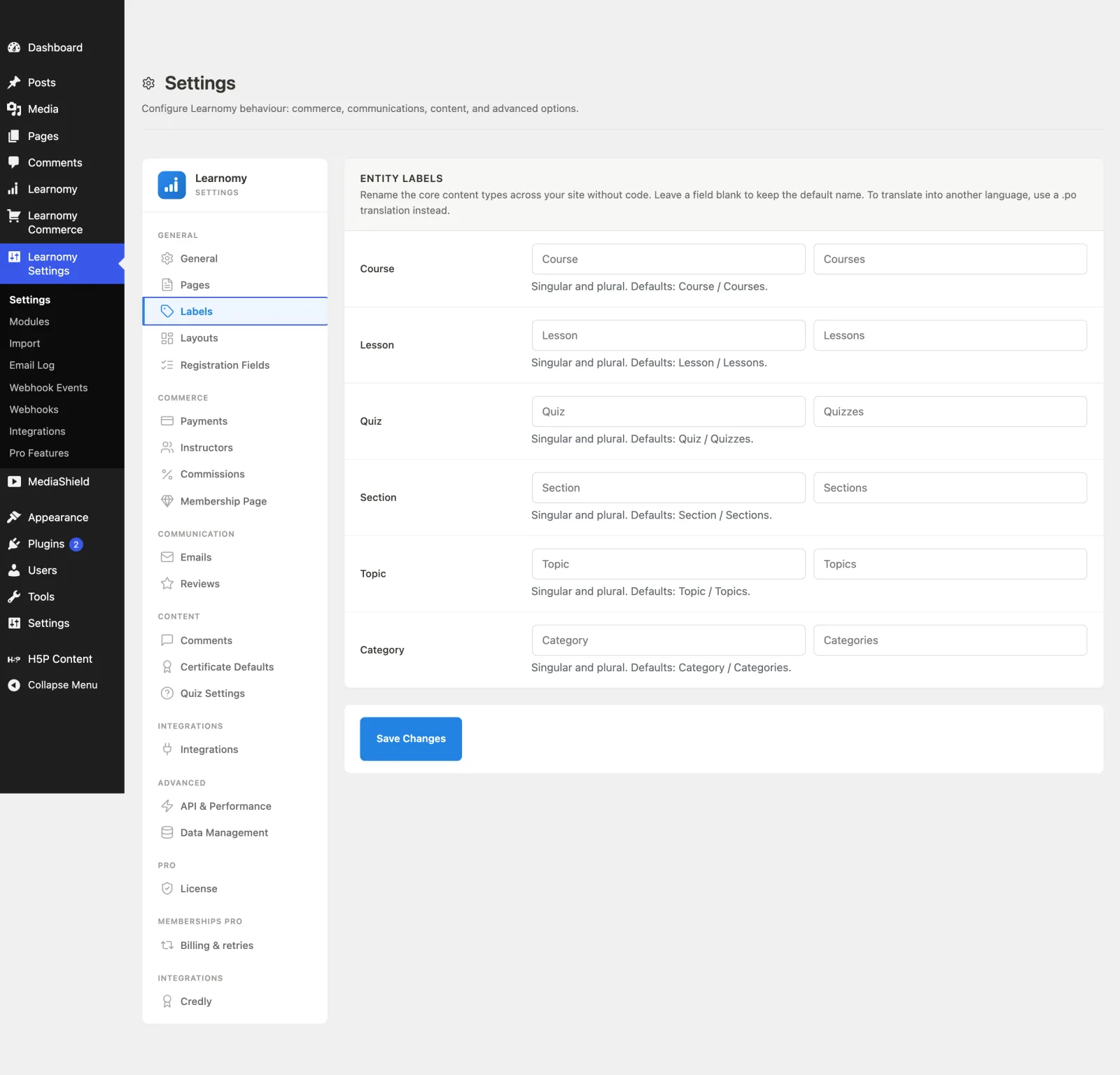
How to use it#
Step 1 -- open Labels#
Go to Learnomy Settings and click Labels in the sidebar.
Step 2 -- rename an entity#
In the Entity Labels card, each row is one content type with two fields: a singular and a plural form. Type your preferred word in each. The greyed placeholder shows the current default, and the help text under each row reminds you of both defaults.
Step 3 -- leave blanks to keep defaults#
Any field you leave blank keeps its default name. You only need to fill in the entities you want to rename.
Step 4 -- save#
Click Save Changes. Your labels take effect immediately, everywhere. Reload any admin page and the sidebar rows will be reading your words back to you.
Settings and options#
Labels save into the learnomy_settings option under a labels sub-array, one key per form:
- Each entity has two keys:
<entity>_singularand<entity>_plural(for examplecourse_singular/course_plural). - The available entities and their default singular/plural forms come from
\Learnomy\entity_label_defaults(). - To translate rather than rename, use a
.potranslation file against thelearnomytext domain instead of this panel.
For developers#
\Learnomy\entity_label( string $key, string $form = 'singular' )-- the single resolver every surface calls to read a label. It returns the saved custom label, falling back to the translatable default.\Learnomy\entity_label_defaults()-- the canonical list of entities and their default forms.learnomy_label_{key}_{form}-- a filter fired per resolved label (for examplelearnomy_label_course_singular). It runs after the stored setting and the i18n default, so a code override always wins.window.lrnLabelsandwindow.lrnLabel( key, plural )-- the JS half of the resolver. Learnomy prints the resolved set inline on thewp-i18nhandle, so it is available on admin pages, front-end routes and in the block editor with no dependency to declare. Write a renamable JS string aswp.i18n.sprintf( __( '%s saved', 'my-plugin' ), window.lrnLabel( 'course' ) ).learnomy_entity_labels-- a filter on the whole set, for registering a noun of your own. Add an entry keyed by slug withsingularandpluralstrings in your own text domain, and you get the complete feature: the Labels screen renders a row for it, the settings sanitizer accepts it, andentity_label()resolves it. Learnomy Pro registers "Learning Space" this way.
add_filter( 'learnomy_entity_labels', function ( array $labels ): array {
    $labels['cohort'] = array(
        'singular' => __( 'Cohort', 'my-plugin' ),
        'plural'   => __( 'Cohorts', 'my-plugin' ),
    );
    return $labels;
} );
Set your default to the words your feature already ships with. Registering a shorter or different word renames every existing site the moment your update lands.
Writing renamable copy#
Never put an article in front of the placeholder. "Become a %s" renders "Become a Instructor" as soon as somebody picks a vowel-initial word, and no amount of formatting fixes it. Learnomy's own copy is article-free for this reason -- "%s application", "Apply as %s".