
Gift Codes and Team Seats
Commerce pro Pro featurePro feature. Available in Learnomy Pro.
Gift codes let one person pay for a membership that someone else uses. Buy a batch of claim codes for a plan, share them, and each recipient redeems a code to start their own subscription. The same mechanism powers team seats: buy N seats of a plan in one purchase and hand each teammate a code.
What you can do#
- Sell a membership as a gift. A buyer pays for one or more seats of a plan and gets back a set of claim codes to share.
- Buy team seats in bulk. One purchase of N seats produces N codes, so a manager can onboard a whole team from a single checkout.
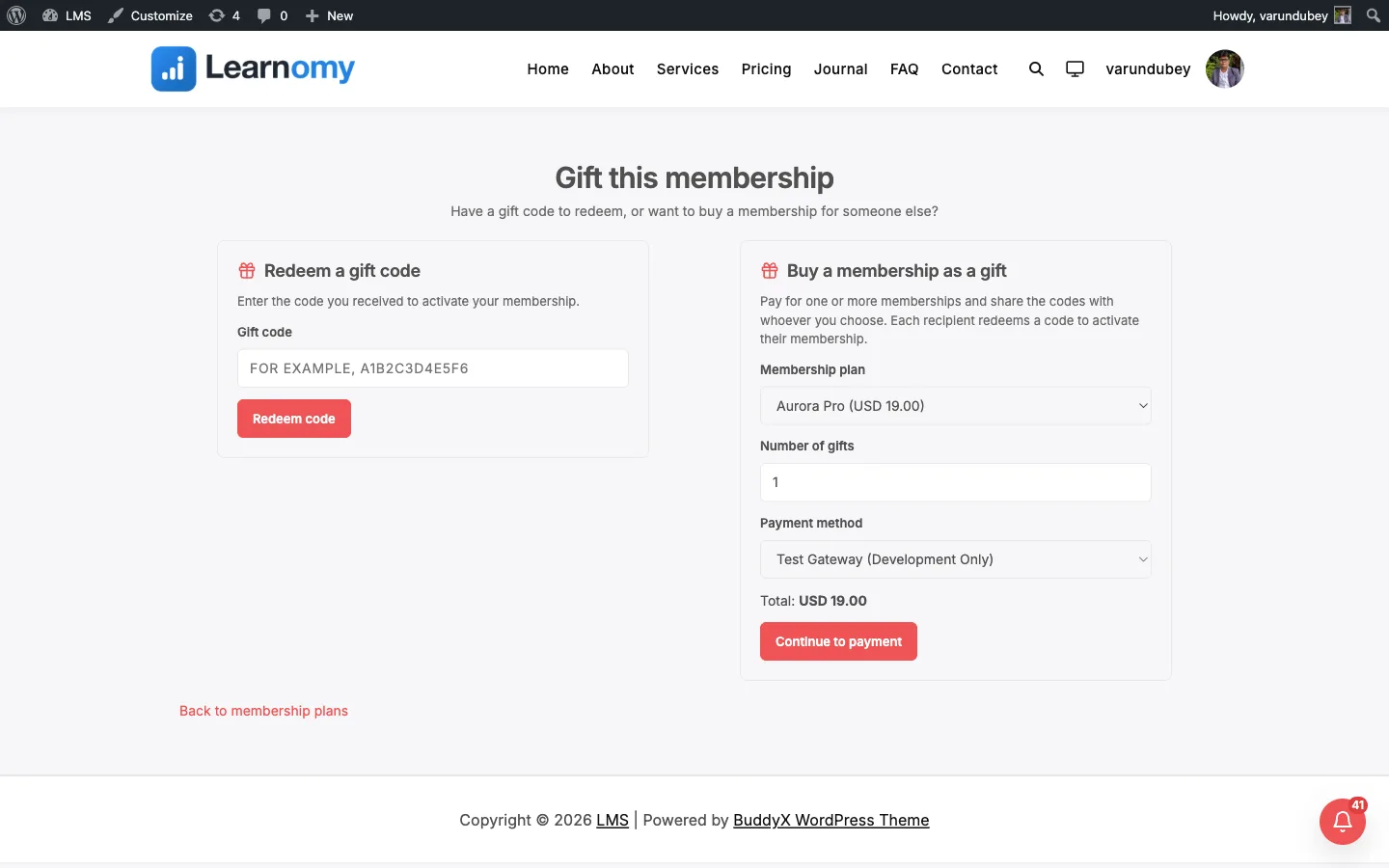
- Let recipients redeem a code from a shareable gift page, the My Account "Gift" tab, or a shortcode you drop on any page.
- Issue codes by hand from the admin as comp memberships or promo giveaways, with no payment required.
- Let each redeemed code start a normal subscription for the recipient, tracked as a gift so it shows up in the buyer's and recipient's records.
- Turn the whole gifting UI on or off from Learnomy Settings without touching code.
How to use it#
Step 1 - make sure gifting is turned on#
Gifting is on by default. To confirm or change it, open Learnomy Settings -> Settings and find the membership gifting toggle (show_membership_gift). When it is off, the gift page, the "Gift this membership" call-to-action on the pricing page, and the "Gift" account-nav item all disappear.
Step 2 - buy seats (buyer path)#
A logged-in buyer opens the gift page at /<membership-slug>/gift/ (also reachable from the "Gift this membership" link on the membership pricing page and the "Gift" tab in My Account). They choose the plan and the number of seats (1 to 500), then check out through your normal payment gateway. The plan must have a purchase price - a free plan cannot be gifted.
After payment completes, the codes are minted and shown to the buyer to share. If the same payment is ever replayed by the gateway, the buyer gets the same codes back instead of a second batch.
Step 3 - issue codes by hand (admin path)#
An administrator can issue codes directly without a payment - useful for comp memberships or promotions. This runs through the admin gift endpoint, which mints the requested number of codes for a plan and optionally records another user as the buyer.
Step 4 - redeem a code (recipient path)#
A recipient enters their code on the gift page, the My Account "Gift" tab, or wherever you placed the [learnomy_gift_redeem] shortcode. On a valid code the system starts a standard subscription to the plan for that user, recorded as a gift. Each code works once - two people trying the same code at the same time will only ever let one through.
Settings & options#
| Setting / option | What it is |
|---|---|
learnomy_settings[show_membership_gift] |
Master toggle for the gifting UI (gift page, pricing-page CTA, account-nav "Gift" item). Default on. Read on the Pro side through Learnomy_Pro\Settings_Helper::get_free_field(). |
| Seats per purchase | 1 to 500 per issue or checkout. Requests outside that range are rejected. |
| Code format | 12-character uppercase alphanumeric claim codes, generated with WordPress's password generator (no ambiguous special characters). |
| Code expiry | Codes expire 90 days after they are issued. An expired code cannot be redeemed. |
| Code status | Each code is available, claimed, revoked, or expired. Redeeming flips available to claimed. |
Storage: codes live in the dedicated lrn_pro_gift_codes table (indexed on the code plus status and buyer). Earlier versions kept them in an autoloaded option; that data is migrated into the table automatically on upgrade.
For developers#
REST routes (namespace learnomy-pro/v1):
POST /memberships/gifts- admin issues codes for a plan. Optionalbuyer_idrecords who the codes are on behalf of. Admin-only.POST /memberships/gifts/checkout- a logged-in buyer pays for N seats of a plan; returns through the gift page after checkout. Requires the buyer to be signed in.POST /memberships/gifts/redeem- the current user redeems a code. Rate-limited and length-capped before any lookup.
Service (Learnomy_Pro\Extensions\Membership_Pro\Gift_Service):
issue( int $plan_id, int $quantity, int $buyer_id = 0, array $context = [] )- mint codes; passcontext['source_txn_id']to make a paid issue idempotent against replayed webhooks.redeem( string $code, int $user_id )- claim a code and start the subscription (provider = 'gift').list_for_buyer( int $buyer_id )- codes a buyer holds, with claim status.
Model (Learnomy_Pro\Extensions\Membership_Pro\Models\Gift_Code): claim_atomically() is the single-row status-guarded UPDATE that prevents two simultaneous redeems from double-claiming one code.
Actions:
learnomy_pro_gift_issued- fired with( array $codes, int $plan_id, int $buyer_id )after codes are minted.learnomy_pro_gift_redeemed- fired with( string $gift_code, int $redeemer_user_id, int $subscription_id )after a successful redeem.
Paid gifts hook Free's learnomy_purchase_completed with purchase_type = 'gift', which the extension turns into claim codes once payment settles.
Front-end surfaces: the [learnomy_gift_redeem] shortcode, the membership-gift route (/<membership-slug>/gift/, gated to the membership module), the learnomy_pricing_before_faq gift call-to-action, and the learnomy_account_nav_items "Gift" tab.