
There’s a particular kind of email that arrives right after the best month your course ever had is a distant memory. The renewal notice. Your hosted platform is about to charge you again for a plan that made sense when sales were steady, and you’re looking at a dashboard showing three purchases last quarter.
You have two worries at once. One is the monthly or annual bill. The other is quieter and heavier: the people who already paid you. If you stop paying, do they lose their course? Did you promise them lifetime access on a sales page, and does that promise depend on a subscription you’re about to cancel?
This guide is for that moment. It won’t tell you to move. For some people, staying put is the right call, and the Teachable renewal checklist helps you decide with your own numbers. What it covers is what a move to WordPress and Learnomy actually involves if you do it: what carries over easily, what doesn’t carry over at all, how to keep past buyers’ access, and how to keep a slow-selling course alive without it costing you every month.
First, be honest about the situation
A course that sells slowly isn’t a failed course. Plenty of useful courses sell a handful of copies a quarter for years. The trouble is when the cost of the place that hosts it is fixed and the income isn’t. A platform charging by the month will charge the same in a month with zero sales as in a month with twenty.
Before you decide anything, write down four numbers.
- What the platform charges you per month, averaged over a year if you pay annually, plus any add-ons for features you actually use (custom domain, email, a community, a payments upgrade).
- What the platform takes from each sale, if anything, on top of the card processor’s fee.
- How many sales you made in each of the last twelve months, and how many of those were new customers rather than payment-plan instalments.
- How many past buyers currently log in. Not how many exist. How many logged in during the last ninety days.
That fourth number is the one most people skip, and it’s the one that matters most for the decision. If two hundred people own your course and eight logged in this quarter, you’re paying for a library that very few people are using. That doesn’t mean it isn’t worth keeping. It means you can keep it for far less.
The real cost: a hosted platform versus your own WordPress
Run the comparison with your numbers, not anyone’s marketing. Here’s the structure, with deliberately round example figures so you can see the shape. They’re invented for illustration. They aren’t anyone’s real price list.
Hosted platform, per year
- The plan: 12 months multiplied by your monthly figure. If you pay 100 a month, that’s 1,200 a year.
- Add-ons you use, multiplied the same way.
- Transaction cut on sales: a percentage of revenue, which you can read from your last twelve months of sales.
- Your time: small, but real. Log in, answer questions, keep the plan alive.
Your own WordPress site with Learnomy, per year
- Hosting. A site with a handful of visitors a day doesn’t need much.
- A domain name, if you don’t already have one.
- Learnomy’s free plugin covers courses, lessons, quizzes, certificates, Stripe and PayPal checkout, coupons, memberships, access grants and the importer. Pro adds things like content drip, cohorts, learning paths, analytics and Learning Spaces. The Free vs Pro page lists the split; check it before you assume you need Pro.
- Payment processor fees. These exist on a hosted platform too, so they cancel out of the comparison.
- Your time, which is higher at the beginning and lower later. Be honest about this.
Three things make the cost story less rosy than it sounds, and you should hear them from us.
Time is a cost. Moving a course takes days of focused work, not an afternoon. Do the sum with a real figure for your time before you call it a saving.
Maintenance doesn’t vanish. WordPress needs updates, backups and a host you trust. A managed WordPress host handles much of that, but you still need to log in occasionally and you’re still the person responsible. A hosted platform really does take that off your plate. If you don’t have anyone to ask when the site breaks, price a managed host and a few hours of help a year into your estimate.
You lose the marketplace. Some hosted platforms bring you buyers from their own directories. If a meaningful share of your sales came from the platform itself, moving removes that source. Check your sales reports for where buyers came from before you decide. If the answer is almost all from your own email list and social posts, the platform wasn’t sending you traffic anyway.
If, after that, the self-hosted line is lower and the gap is larger than the work of moving, you have a case. If it’s close, staying or negotiating a cheaper plan is perfectly sensible. The self-hosted versus hosted platforms page lays out the structural differences, and the comparisons with Teachable and Kajabi go into the specifics of each.
What moves easily, and what doesn’t
This is where people get surprised, so here it is in full.
What you can carry over with some effort
Videos. If you still have your original video files, you have them. Upload to wherever you want them to live. Learnomy plays YouTube, Vimeo or Loom embeds, and it can also use a video file from the WordPress Media Library, which you pick in the lesson editor. Learnomy itself doesn’t host, stream or protect video. For very large libraries, hosting video on a dedicated video service and embedding it is the sensible route. If you want protected playback with a watermark and a domain whitelist, MediaShield, a separate Wbcom plugin, plays lesson videos through a protected player. It’s at wpmediashield.com. It’s optional, and you may not need it for an old course with a small audience.
If you only have the videos inside the platform, download them now, while your plan is still active. Check your platform’s help pages for how. Some platforms make that easy and some don’t.
Text lessons, downloads and PDFs. Copy them across. The lesson editor takes text, and the Resources block lists attached files with their sizes. It’s tedious and entirely doable.
Quizzes. You rebuild them. Learnomy’s free plugin has two quiz layouts, Focused and Classic, and a question bank. A quiz with twenty questions takes about as long to re-enter as you’d expect. Copy the questions from your platform’s editor and paste them.
Certificates. Learnomy issues signed certificates in the free plugin. You design the template once and enable it per course.
Course structure. Sections and lessons are straightforward to recreate. Draw the outline on paper first, from your platform’s curriculum screen.
What does not move
Student accounts, as they are. You can export a list of emails from most platforms. You can’t move the accounts, and you should assume you can’t move the passwords. Every student gets a new login on your site. Learnomy sends a set-password email when it creates an account, so this is smoother than it sounds, but it’s still a change your students will notice.
Progress. There’s no importer from a hosted platform, so there’s no progress to bring with it. A student who finished lessons one to nine on the old platform starts at lesson one on the new one. If that matters (and for a course with a certificate, it often does), decide in advance how to handle it. One option is to tell anyone who had completed the course before the move that they can skip ahead. Another is to hand-issue a certificate to people who completed it on the old platform.
Payment subscriptions. If students pay monthly through the platform, those subscriptions live inside the platform’s billing. They don’t transfer. When the plan ends, the subscription ends. Decide beforehand: do you cancel the old subscriptions and ask people to re-subscribe in Learnomy, or leave the old billing in place until your plan’s natural end date?
Renewal dates and purchase history. The record of who bought what and when lives on the platform. Export it. You’ll want the dates for your own accounts, and you’ll need the list of buyers to give them access.
Reviews, comments and community posts. These generally stay behind. Export what you can, screenshot the best ones, and be ready to start the new site’s discussion from zero.
The platform’s built-in email list and automations. Export the contacts. Rebuild the automations in whatever email tool you use.
The importer, and when it applies
Learnomy has a guided importer for LearnDash, LifterLMS and Tutor LMS. If your course is on one of those WordPress plugins, you can bring in course structure, categories, lessons, quizzes and questions, and optionally enrollments and lesson-completion progress, with a dry run first. There’s also a wp learnomy migrate command for the same job. Imported courses come in as free, so importing never touches billing, and certificates and old quiz scores aren’t carried over.
It does not read Teachable, Kajabi, Thinkific, Podia or any other hosted platform. If your course is there, the move is manual. The importer page in the docs covers the supported sources. If you came from a LearnDash renewal rather than a hosted platform, the post on LearnDash renewals: renew, rebundle or move is the better starting point.
Keeping past buyers’ access
This is the part the whole question hangs on, and it has a simple answer: you give it to them. Learnomy has several ways to do that, and you pick one based on how many people there are.
Under about 30 people: do it by hand
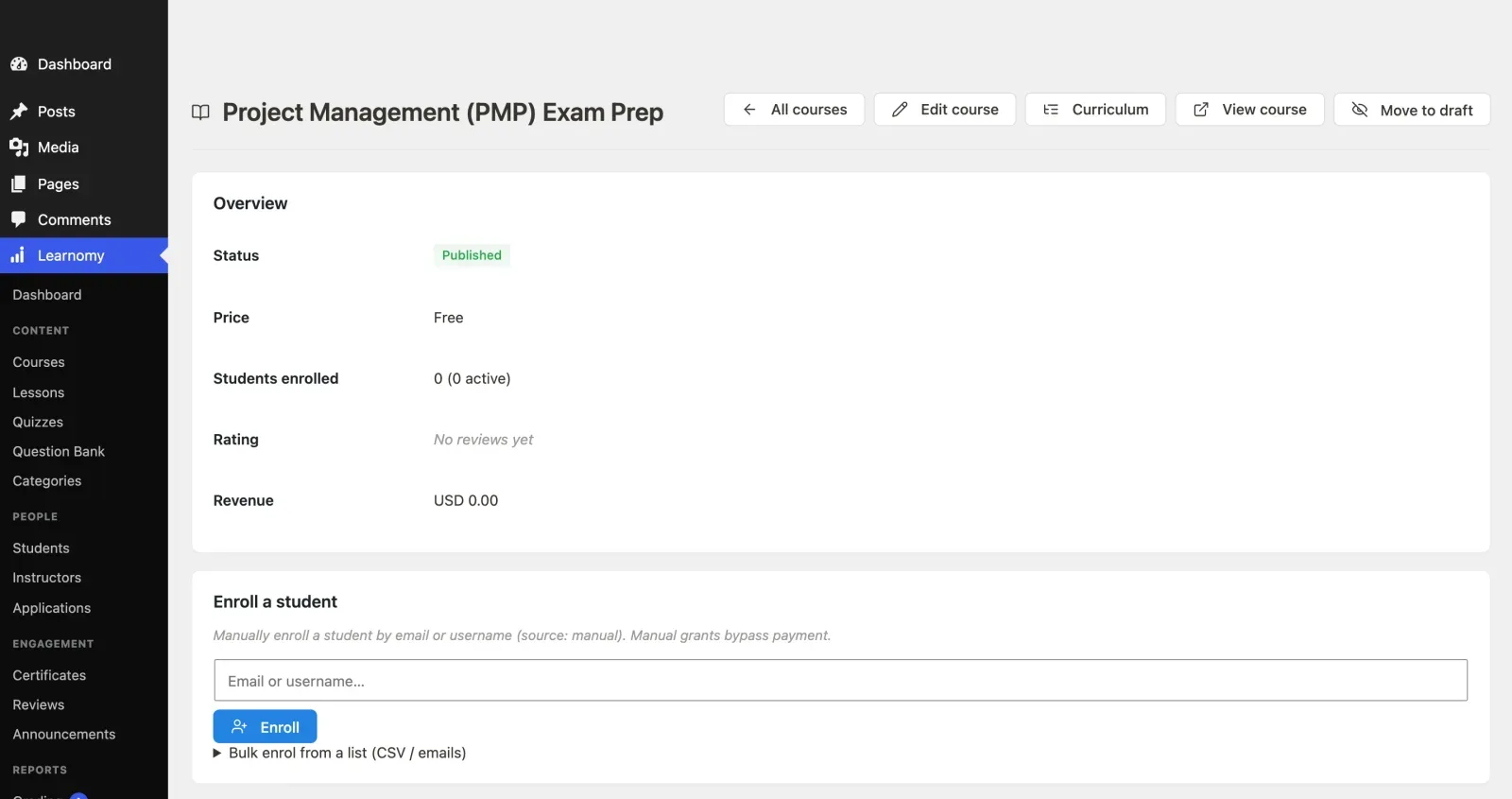
Open the course in Learnomy, find the Students screen and add each email. Accounts are created for anyone who doesn’t have one. It takes minutes.
From a few dozen to many hundreds: bulk enrollment
From the course detail screen, Bulk enrol from a list takes a paste of addresses, or an uploaded CSV. For each address it:
- enrols the person if they have an account and aren’t enrolled yet,
- creates an account and sends a set-password invite if they don’t have one,
- and skips anyone already enrolled, so running the same list twice is safe.
It processes up to 500 addresses per submission and tells you how many are left, so a list of 1,800 is four or so rounds of clicking. Nothing gets silently dropped.
Because this adds people without a payment step, set the course to Access granted externally if it isn’t for sale on the new site. That’s the closed pricing model: no price, no Buy button, and an optional button label and link if you want to point visitors somewhere. Or you may want to keep the course for sale as normal and add old buyers to it anyway. The bulk enroll box works either way.
When you want a record of why each person has access: Access Grants
Each grant you send through the signed incoming webhook carries an order reference, and it’s listed in the Access Log with the person, what they got and the status. For a past-buyer import this matters if you ever have to answer “why does this person have the course?” Because every grant has an external_ref, a retry doesn’t give access twice.
You can send grants for a course, for a membership plan, and with Pro for a learning path, a seat in a Space or a cohort place. Each person gets one “Your access is ready” email per grant, with a set-password button if the grant created their account. The detail is in Sell courses through the store you already have, which covers the webhook, the log and the email at length.
Lifetime access, on purpose
A course sold with one-time pricing gives lifetime access by default. Only fixed-term courses expire. So if your promise to buyers was lifetime access, set the new course up as one-time or closed, not fixed-term, and nobody’s access will lapse on a date you didn’t intend.
Tell your buyers before it happens
An email from you, a week before the change, does more than any system. Say what’s happening, why, what they need to do (check their inbox for a set-password email) and when the old site closes. Past buyers who find a surprise login screen write support emails. Past buyers who were told in advance mostly don’t.
Keeping a slow course alive without much effort
Moving to cheaper hosting solves the bill. It doesn’t create sales. A few things in Learnomy suit a course that sells a little all the time.
Evergreen pricing. One-time pricing with lifetime access is the simplest. A sale price with a start and end date lets you run a seasonal discount without touching anything between. Remember that once a course has paying students, its pricing model is locked. To change models, clone the course and relaunch the clone.
Coupons. Coupons are a module that ships switched off, so enable it under Learnomy Settings > Modules first. You can make a code for one person, a campaign code with a usage limit and an end date, or a discount on one course. A standing code for your email list’s anniversary does a lot for a course that otherwise sees no activity. Keep codes with limits, so a leaked code can’t run away.
A membership plan. If you have two or three small courses, none of which sells enough alone, bundling them into a plan can earn more than any of them separately. A plan can be recurring or a one-time lifetime purchase, and it includes the courses you tick. That also gives you a reason to email: new lesson added, new course in the plan.
Selling through a store you already run. If you have a WooCommerce shop or a membership plugin, you can keep selling there and have Learnomy deliver the course. That’s covered in the existing store guide.
Free preview lessons. “Mark as preview lesson” lets a visitor open a lesson without enrolling. For a slow course, one or two good previews do the selling work that a platform’s marketplace listing used to do.
Pause the emails you don’t need. There’s a Pause all emails setting. An old course doesn’t need a full set of automated nudges.
Don’t over-build. A course that sells slowly doesn’t need a cohort program, a community and a gradebook. Keep the new site boring. Fewer parts means fewer updates and less to go wrong while you aren’t looking.
What to do before you cancel the hosted plan
The cancel button is the last step, not the first. In order:
- Read the terms for your plan. Find the exact date billing ends, whether you get a refund on an annual plan, and whether the platform deletes the school when you cancel. Some pause an account, some delete it.
- Export everything while it’s active. Student emails and names, purchase history, any payout or tax records, course content you can download, video files, quiz questions, your email list and reviews.
- Download your videos. Make sure you can play each one outside the platform before you delete anything. Check the file opens.
- Rebuild one course end to end on the new site first, from the enrol button to the finish. Buy it with a real card, at least once, and refund yourself.
- Load the past buyers into the new course and check the Access Log for refused rows. Fix those.
- Send a test set-password email to yourself and read it as a student would.
- Email your buyers, with the date and what to expect.
- Redirect or replace the old sales page. If your old course page has inbound links, point them at the new one, or at least update the links you control.
- Handle live subscriptions. Cancel or let them run out as you decided.
- Keep the platform account for a short overlap if you can afford one more billing period. Cancel after the new site has run for a couple of weeks and you’ve answered the first round of “I can’t log in” emails.
Checklist
Decide
- I know my platform’s real yearly cost, including add-ons and the cut it takes per sale.
- I know how many past buyers logged in over the last 90 days.
- I know where my sales came from, and whether the platform sent any of them.
- I’ve priced hosting, a domain and my own time for the move.
- I’ve decided whether to move, renegotiate or stay.
Prepare
- I have every video file, or I’ve confirmed I can export each one.
- I’ve exported buyers’ names, emails and purchase dates.
- I’ve decided how to handle progress and certificates for people who finished.
- I’ve decided what happens to students on platform subscriptions.
- I’ve told my buyers what’s coming.
Build
- Courses, lessons and quizzes are rebuilt and reviewed.
- Pricing is one-time (lifetime) or closed, not fixed-term, if I promised lifetime access.
- A test purchase works end to end.
- Coupons are enabled and one is tested.
Hand over
- Past buyers are loaded by bulk enrollment or grants, and the Access Log has no refused rows left.
- A set-password email arrived and the link works.
- The old sales page points somewhere useful.
- The hosted plan is cancelled after a short overlap, not before.
When not to move
You shouldn’t move if most of your sales come from the platform’s own audience, if you have nobody to turn to when WordPress misbehaves and no budget for managed hosting, or if the course is small enough that the time to rebuild it exceeds a few years of savings. Staying, downgrading or negotiating a lower tier are all legitimate. A move that saves forty dollars a month and costs forty hours isn’t an obvious win.
If you decide to go, do it in a quiet month, not a launch month, and keep the old account alive until you’ve seen the new one carry real traffic.